Kailangan ang browser ng Opera.
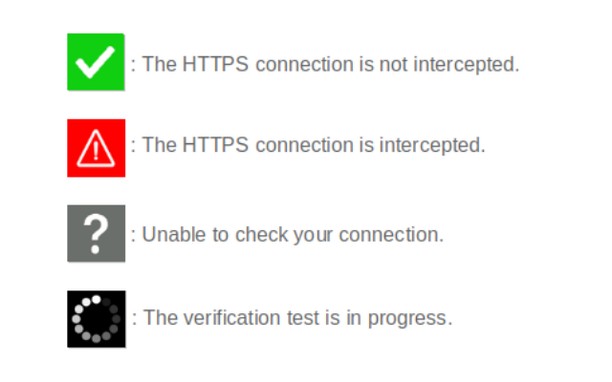
When browsing on secured sites ("https://..." websites), you can check the security status by clicking on the extension icon.
- The icon is green : your connection is not compromised;
- The icon is red : your connection is considered very risky (hijacked, modified, listened);
- The icon is gray : the verification is impossible (check server is unreachable, network error);
- The icon is black : the verification is in progress.
Technical details :
Normally, before encrypting an HTTPS connection, a secure website must prove its identity to your browser by sending it its security certificate. This certificate can be considered as an identity card issued by higher authorities (Certificate Authorities). There are several techniques of usurpation based on false certificates (false identity cards) or homographers (false names) to make you believe that a pirate site is the legitimate site you think you are visiting. These techniques allow pirate sites to retrieve your private information.
CheckMyHTTPS allows you to detect this type of practice, which can be implemented on open networks (WiFi in hotels, conference centers, stations, etc.) or even within your company via its firewall (SSL inspection). To detect this, the extension compares the certificate of the visited site that is received by your browser with the same certificate retrieved by an external check server located on the Internet. If the certificates differ, the identity of the server can be considered as usurped (red icon).
Respect for privacy :
The CheckMyHTTPS extension requires to send only two parameters to the check server :
- The domain name of the visited website;
- The IP address of the visited website.
You have free choice regarding the website to check.
Moreover, we give you the possibility to be free regarding the check server as you can make and host your own.
All explanations are detailed on the https://checkmyhttps.net project website.
- Ma-a-access ng extension na ito ang iyong data sa lahat ng website.
- This extension can create rich notifications and display them to you in the system tray.
- Ma-a-access ng extension na ito ang aktibidad ng iyong mga tab at pagba-browse.
Mga screenshot
Tungkol sa extension
- Mga download
- 1569
- Kategorya
- Pagiging produktibo
- Bersyon
- 5.7.3
- Laki
- 316.1 KB
- Last update
- March 13, 2026
- Lisensya
- Patakaran ng Pagkapribado
- Website ng serbisyo
- https://checkmyhttps.net/
- Pahina ng suporta
- https://github.com/checkmyhttps/checkmyhttps/issues
- Pahina ng source code
- https://github.com/checkmyhttps/checkmyhttps/tree/master/Chromium
Related
-
BackChain
Adds a button to the top-left of every page to return to the website from which that page was linked.
Rating: Kabuuang bilang ng mga rating: 1
-
Evernote Web Clipper
Use the Evernote extension to save things you see on the web into your Evernote account.
Rating: Kabuuang bilang ng mga rating: 611
-
Frontier Wallet
One Web3 Wallet you need. Crypto, DeFi, NFTs, and more | Frontier
Rating: Kabuuang bilang ng mga rating: 3
-
YouLoop for YouTube
Repeat video/audio endless on YouTube. Furthermore a partition loop function is enable.
Rating: Kabuuang bilang ng mga rating: 14
-
Atavi bookmarks
Visual bookmarks, bookmarks sync across various browsers and absolute safety for your bookmarks
Rating: Kabuuang bilang ng mga rating: 169