จำเป็นต้องมี เบราเซอร์ Opera
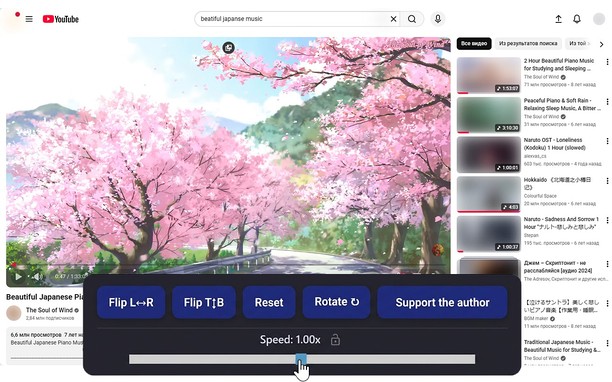
Reflects video vertically and horizontally, speeds up or slows down playback, rotates by 90°, and compresses video height and width — useful for fixing distorted videos.
How it works
Hotkeys:
Alt + * (NumPad): Show/hide control panel.
Alt + 1 / 3 (NumPad): Decrease or increase playback speed (step 0.01).
🔒 Lock near the speed — if you click it, it will remember any changed speed for the entire domain.
Alt + 4 / 6 (NumPad): Compress or stretch the frame horizontally.
Alt + 2 / 8 (NumPad): Compress or stretch the frame vertically.
Alt + 5 (NumPad): Reset all settings.
Alt + 7 (NumPad): Decrease frame size on both axes.
Alt + 9 (NumPad): Increase frame size on both axes.
Alt + 0 (NumPad): Rotate video 90°.
Compatibility:
Works on almost all sites.
Works in full-screen mode.
- ส่วนขยายนี้สามารถเข้าถึงข้อมูลของคุณในเว็บไซต์ทั้งหมด
สกรีนช็อต
เกี่ยวกับส่วนขยาย
- ดาวน์โหลด
- 8,611
- หมวดหมู่
- ประสิทธิภาพ
- เวอร์ชัน
- 1.4.0
- ขนาด
- 60.3 KB
- Last update
- 17 กุมภาพันธ์ 2026
- ใบอนุญาต
- นโยบายความเป็นส่วนตัว
Related
-
Atavi bookmarks
Visual bookmarks, bookmarks sync across various browsers and absolute safety for your bookmarks
คะแนน: จำนวนคะแนนรวมทั้งหมด: 171
-
EX.UA/FS.UA без рекламы
Allows to disable the ad units: in the top, between the elements of the list, at the homepage, as well as on the search pages.
คะแนน: จำนวนคะแนนรวมทั้งหมด: 9
-
Simple Context Share
Share to Facebook, Twitter, Gmail and more using the context menu
คะแนน: จำนวนคะแนนรวมทั้งหมด: 12
-
Evernote Web Clipper
ใช้ส่วนขยาย Evernote เพื่อบันทึกสิ่งต่างๆ ที่คุณเห็นบนเว็บลงในบัญชี Evernote ของคุณ
คะแนน: จำนวนคะแนนรวมทั้งหมด: 633
-
MoreGestures
Mouse gestures for links and the mousewheel.
คะแนน: จำนวนคะแนนรวมทั้งหมด: 15