จำเป็นต้องมี เบราเซอร์ Opera
Screen Recorder addon helps you record video from the computer's screen.
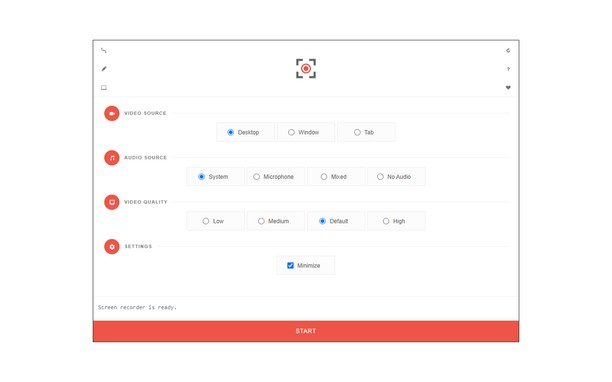
To work with this addon, please click on the toolbar button. Once the recorder interface appears, please adjust desired options, and then click the - Start - button. The video source could be your screen, window, or tab. The audio source can be the system's audio, microphone, mixed, or no audio at all. When you click the start button, a popup will appear within the interface. This popup window allows you to select the desired screen, tab, or window. To start recording please click on the - Share - button. When you are done recording the screen, please press the toolbar button (or the stop button on the app interface) to stop the recording process. The recorded video will be download to your computer automatically (on the default download location).
By default, recorded media is in - webm - format. To get more information about webm video format, please visit this Wikipedia page (https://en.wikipedia.org/wiki/WebM). If you want to change this format to a different one, please use a different software.
To report bugs, please fill the bug report form on the addon's homepage (https://mybrowseraddon.com/screen-recorder.html).
- ส่วนขยายนี้สามารถบันทึกเนื้อหาของหน้าจอทั้งหมดหรือแท็ปและหน้าต่างแต่ละอัน
- This extension can store an unlimited amount of client-side data.
สกรีนช็อต
เกี่ยวกับส่วนขยาย
- ดาวน์โหลด
- 46,175
- หมวดหมู่
- ประสิทธิภาพ
- เวอร์ชัน
- 0.1.5
- ขนาด
- 41.6 KB
- Last update
- 1 กุมภาพันธ์ 2023
- ใบอนุญาต
- Copyright 2021 moristong
- หน้าการสนับสนุน
- https://mybrowseraddon.com/screen-recorder.html
Related
-
Atavi bookmarks
Visual bookmarks, bookmarks sync across various browsers and absolute safety for your bookmarks
คะแนน: จำนวนคะแนนรวมทั้งหมด: 172
-
Body Sculpting
this is all about Body Sculpting
คะแนน: จำนวนคะแนนรวมทั้งหมด: 1
-
CPS Tap Counter - Count taps
Track your Spacebar counts with Tap Counter Opera Extension.
คะแนน: จำนวนคะแนนรวมทั้งหมด: 1
-
Print Selection to PDF
Select a text and print it to PDF with mouse right-click
คะแนน: จำนวนคะแนนรวมทั้งหมด: 8
-
Evernote Web Clipper
ใช้ส่วนขยาย Evernote เพื่อบันทึกสิ่งต่างๆ ที่คุณเห็นบนเว็บลงในบัญชี Evernote ของคุณ
คะแนน: จำนวนคะแนนรวมทั้งหมด: 632