


 จำเป็นต้องมี เบราเซอร์ Opera
- ส่วนขยายนี้สามารถเข้าถึงข้อมูลของคุณในเว็บไซต์ทั้งหมด
- ส่วนขยายนี้จะจัดการส่วนขยายของคุณ
- ส่วนขยายนี้สามารถเข้าถึงการตั้งค่าพร็อกซีของคุณ
- ส่วนขยายนี้สามารถเข้าถึงแท็บและกิจกรรมการท่องเว็บของคุณ
สกรีนช็อต

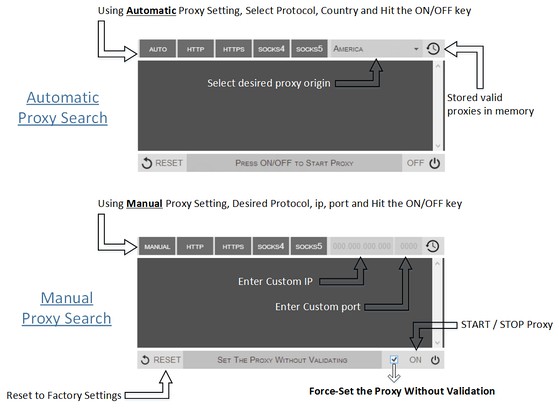

เกี่ยวกับส่วนขยาย
- ดาวน์โหลด
- 89,149
- หมวดหมู่
- ประสิทธิภาพ
- เวอร์ชัน
- 0.1.3
- ขนาด
- 52.8 KB
- Last update
- 9 กันยายน 2014
- ใบอนุญาต
- Copyright 2014 philiptholus
Related
-

Evernote Web Clipper
ใช้ส่วนขยาย Evernote เพื่อบันทึกสิ่งต่างๆ ที่คุณเห็นบนเว็บลงในบัญชี Evernote ของคุณ
-

Date Today
The best clock to see the current day and time at a glance, with an option to display a digital clock.
-

List Highlighter for Trello
Change list background colours
-

Audio Booster: Real Surround, EQ & Spatial Sound
เปลี่ยนสเตอริโอของแท็บใดก็ได้เป็นเซอร์ราวด์หรือเสียง 8D เพิ่มระดับเสียงและปรับด้วย EQ 7 แบนด์และตัวนอร์มาไลซ์
-

Boomerang for Gmail™
Allows you to schedule messages to be sent or returned at a later date.