จำเป็นต้องมี เบราเซอร์ Opera
Open in IE™ addon gives you the ability to open any link in an Internet Explorer page from Chrome.
Note 1: after installing the addon, you need to connect it with native applications (i.e. IE) on your machine. To make this connection, a separate patch is provided in GitHub. Please download and install this patch from: https://github.com/alexmarcoo/open-in-native-client/releases
Follow the instruction on the above GitHub page to download and install the related patch to your system. After installing, the "Open in IE™" addon in your Chrome browser can communicate with IE on your Windows machine.
Note 2: before using the addon, please open the option's page and make sure the path to IE is correct based on your Operating System. For example, the path to IE in Windows 10 is: C:\Program Files\Internet Explorer\iexplore.exe
Next, please follow the below steps to open desired links in IE.
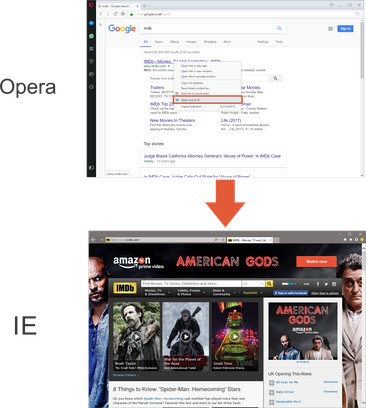
a. Right-click on any link and then click on the Open link in IE (from the context-menu).
b. You can choose to open the window in private (incognito) or normal mode (see the addon's options page).
c. It captures the link from any text content within the page (i.e. for those links that are not hyperlinked).
d. You can set the IE path in your machine from the options page.
Note 3: please note that the Open in IE™ addon, does NOT belong or relate to Internet Explorer, IE, or Microsoft corp at all. It is an unofficial extension that is developed and maintained independently by its author.
To report any bugs, please fill out the bug report form on the addon's homepage (https://mybrowseraddon.com/open-in-ie.html).
- This extension can exchange messages with programs other than Opera.
- This extension can create rich notifications and display them to you in the system tray.
สกรีนช็อต
เกี่ยวกับส่วนขยาย
- ดาวน์โหลด
- 32,677
- หมวดหมู่
- ประสิทธิภาพ
- เวอร์ชัน
- 0.1.7
- ขนาด
- 29.4 KB
- Last update
- 2 มีนาคม 2026
- ใบอนุญาต
- Copyright 2026 alexmarcoo
- หน้าการสนับสนุน
- https://mybrowseraddon.com/open-in-ie.html
Related
-
BackChain
Adds a button to the top-left of every page to return to the website from which that page was linked.
คะแนน: จำนวนคะแนนรวมทั้งหมด: 1
-
Atavi bookmarks
Visual bookmarks, bookmarks sync across various browsers and absolute safety for your bookmarks
คะแนน: จำนวนคะแนนรวมทั้งหมด: 160
-
Evernote Web Clipper
ใช้ส่วนขยาย Evernote เพื่อบันทึกสิ่งต่างๆ ที่คุณเห็นบนเว็บลงในบัญชี Evernote ของคุณ
คะแนน: จำนวนคะแนนรวมทั้งหมด: 554
-
Serpstat Website SEO Checker
Instantly check your website's SEO, analyze competitors and get advantage of powerful search analytics in one place.
คะแนน: จำนวนคะแนนรวมทั้งหมด: 11
-
Draftsman Ruler and Color Picker
On-page ruler, eyedropper and live font & size inspector for designers and developers. Runs fully locally.
คะแนน: จำนวนคะแนนรวมทั้งหมด: 0