จำเป็นต้องมี เบราเซอร์ Opera
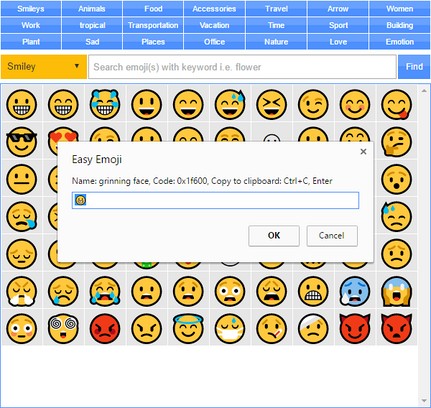
Easy Emoji addon lets you find and copy desired emoji from your Opera's toolbar popup UI with just one click.
Some important features:
1. Over 1800 emojis to choose from.
2. Toolbar popup has a built-in finder to search and find desired emojis.
3. Click on each emoji to see details and copy the icon to clipboard.
4. No settings or options to adjust.
Note 1: in order to copy each emoji icon, simply click on it. The emoji will be copied to the clipboard automatically.
Note 2: depending on your browser's version and operating systems, some emoji icons may not render properly.
Note 3: in order to report bugs, please fill the bug report form in the addon's homepage (http://mybrowseraddon.com/easy-emoji.html).
- This extension can write data into the clipboard.
สกรีนช็อต
เกี่ยวกับส่วนขยาย
- ดาวน์โหลด
- 16,488
- หมวดหมู่
- เครือข่ายสังคม
- เวอร์ชัน
- 0.1.3
- ขนาด
- 52.9 KB
- Last update
- 2 สิงหาคม 2019
- ใบอนุญาต
- Copyright 2019 moristong
- หน้าการสนับสนุน
- http://mybrowseraddon.com/easy-emoji.html
Related
-
Галерея поздравлений (открытки и музыка)
คะแนน: จำนวนคะแนนรวมทั้งหมด: 15
-
what is word hunt in Subway
This ext help you to know what is word hunt in Subway Surfers,where to find it
คะแนน: จำนวนคะแนนรวมทั้งหมด: 3
-
Outbox for Tumblr
Save outgoing Tumblr asks automatically
คะแนน: จำนวนคะแนนรวมทั้งหมด: 1
-
Remark
Uncensored Comments, anywhere.
คะแนน: จำนวนคะแนนรวมทั้งหมด: 1
-
Meeting
a secure peer-to-peer video and audio conference using WebRTC
คะแนน: จำนวนคะแนนรวมทั้งหมด: 1