จำเป็นต้องมี เบราเซอร์ Opera
Copy LaTeX code from any KaTeX or MathJax-rendered math expression directly in your browser. It also works with Wikipedia images. Hover over an equation and then click to copy the LaTeX code to your clipboard. Works on ChatGPT, DeepSeek, Stack Exchange, GitHub, ProofWiki and any website using KaTeX or MathJax as well as Wikipedia and Wikiwand.
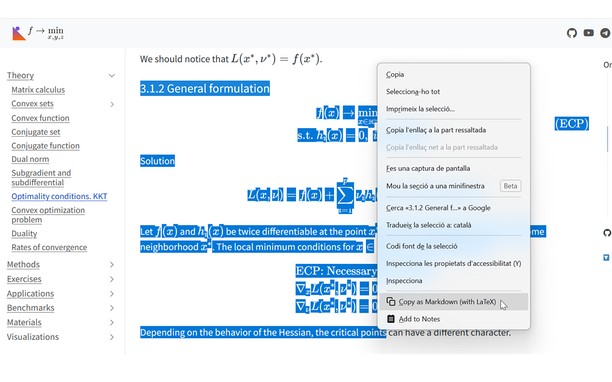
v1.4 Update: Now you can also select text that includes equations and right click to copy the selection as Markdown.
v1.5 Update: Now with Typst support! You can choose between LaTeX mode or Typst mode.
v1.6 Update: You can now set some config options like the theme or the context menu in the popup UI.
v1.7 Update: Now you can enable Ctrl+C to copy the selection and can disable the hover overlay (and use right click instead).
You can see a tutorial on how to disable or add certain sites and read more information about this add-on in the GitHub repo of the extension: https://github.com/Mapaor/copy-latex-chrome-extension.
- ส่วนขยายนี้สามารถเข้าถึงข้อมูลของคุณในเว็บไซต์ทั้งหมด
- This extension can write data into the clipboard.
สกรีนช็อต
เกี่ยวกับส่วนขยาย
- ดาวน์โหลด
- 2
- หมวดหมู่
- ประสิทธิภาพ
- เวอร์ชัน
- 1.7.2
- ขนาด
- 158.5 KB
- Last update
- 20 พฤศจิกายน 2026
- ใบอนุญาต
- หน้าการสนับสนุน
- https://mapaor.github.io/copy-latex-website
- หน้าซอร์สโค้ด
- https://github.com/Mapaor/copy-latex-chrome-extension
Related
-
Boomerang for Gmail™
Allows you to schedule messages to be sent or returned at a later date.
คะแนน: จำนวนคะแนนรวมทั้งหมด: 48
-
SPOI Options
Control the way you watch video online.
คะแนน: จำนวนคะแนนรวมทั้งหมด: 13
-
Melanto Calculator
Easy to use scientific calculator ...
คะแนน: จำนวนคะแนนรวมทั้งหมด: 14
-
Evernote Web Clipper
ใช้ส่วนขยาย Evernote เพื่อบันทึกสิ่งต่างๆ ที่คุณเห็นบนเว็บลงในบัญชี Evernote ของคุณ
คะแนน: จำนวนคะแนนรวมทั้งหมด: 540
-
Open in Yandex browser
Open current page, link, or all tabs in the Yandex browser.
คะแนน: จำนวนคะแนนรวมทั้งหมด: 8