จำเป็นต้องมี เบราเซอร์ Opera
A tool for boosting or reducing (attenuating) the levels of different frequencies of media elements in web pages.
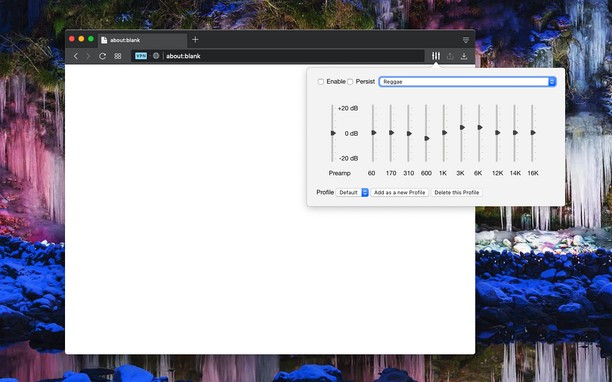
The most basic type of equalization is the bass control on the old home audio equipment to control low frequencies and the treble control to adjust high frequencies. Since there are only two controls, the adjustment is for a fairly wide range of frequencies. In this extension, however, you can adjust a wide set of frequency ranges (60, 170, 310, 600, 1K, 3K, 6K, 12K, 14K, 16K) similar to the well-known VLC player.
The extension adds a toolbar button to your browser to control audio equalization simply from its popup window. There are about 12 presets to select from or you can adjust your own levels. The extension offers profiling to keep user selections in different profiles.
This extension supports pre-amplification for each profile as well. Basically, you have a global volume control to adjust the level of each profile too.
For more info please read the FAQs page. You can submit bug reports in the GitHub page.
- ส่วนขยายนี้สามารถเข้าถึงข้อมูลของคุณในเว็บไซต์ทั้งหมด
สกรีนช็อต
เกี่ยวกับส่วนขยาย
- ดาวน์โหลด
- 528,919
- หมวดหมู่
- เพลง
- เวอร์ชัน
- 0.2.2
- ขนาด
- 72.4 KB
- Last update
- 28 พฤศจิกายน 2022
- ใบอนุญาต
- Copyright 2022 lunu-bounir
- เว็บไซต์การบริการ
- https://add0n.com/audio-equalizer.html
- หน้าการสนับสนุน
- https://add0n.com/audio-equalizer.html
- หน้าซอร์สโค้ด
- https://add0n.com/audio-equalizer.html
Related
-
Smooth Jazz South Florida
Listen Smooth Jazz South Florida Radio with Opera Browser.
คะแนน: จำนวนคะแนนรวมทั้งหมด: 1
-
Now Playing - OBS
Client for OBS now playing widget
คะแนน: จำนวนคะแนนรวมทั้งหมด: 1
-
Theater Mode for YouTube™
Forces YouTube to open the player in the theater mode (full-width mode) even if you are logged out
คะแนน: จำนวนคะแนนรวมทั้งหมด: 6
-
YouTube™ on Hover
View YouTube while hovering mouse over a YouTube link on any website
คะแนน: จำนวนคะแนนรวมทั้งหมด: 5
-
xorosho.com +
คะแนน: จำนวนคะแนนรวมทั้งหมด: 2