Webbläsaren Opera krävs.
This is the only official TinEye extension developed by the TinEye team.
Search TinEye to quickly find out where an image came from, how it's used, or identify higher-resolution versions.
About TinEye
TinEye invented reverse image search in 2008 to make images searchable.
Learn more about TinEye here: https://tineye.com/about
How TinEye can help:
• Debunk fake images
• Tell you where an image came from
• Help attribute images
• Show you where an image is being used online
• Identify if an image is a stock photo
• Find higher-resolution copies
• Verify dating profiles
Learn how to use TinEye in our tutorial: https://tineye.com/how
Private & secure
Your search image is never saved. We only collect extension version data. For more information, please see our privacy policy: https://tineye.com/privacy and our terms of service: https://tineye.com/terms.
How to use this extension:
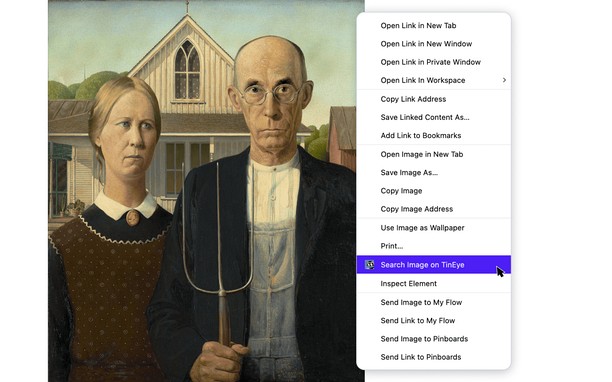
1. Right-click an image from the web and select ‘Search image on TinEye’ from the menu.
2. View TinEye results.
How to configure the TinEye extension:
You can choose to open TinEye.com results in the current tab, a new active tab, or a new background tab, and you can select how your results are initially ordered: Last Used settings, Best Match, Most Changed, Biggest Image, Newest, or Oldest.
To set preferences, click the TinEye icon in your menu bar and select ‘Extension Options’. If the icon isn’t pinned, click the cube icon in your browser’s top-right corner, then the three dots next to ‘TinEye Reverse Image Search’, and select ‘Extension Options’.
Skärmbilder
Om tillägget
- Hämtningar
- 361 352
- Kategori
- Sök
- Version
- 2.0.4
- Storlek
- 26,1 kB
- Last update
- 12 februari 2025
- Licens
- Copyright 2024 TinEye
- Sekretesspolicy
- Servicewebbplats
- https://tineye.com
- Supportsida
- https://tineye.com/extensions
Related
-
Jeddsan Kora
Jeddsan Kora, der smarte und sichere Assistent für jedes Gerät.
Betyg: Totalt antal betyg: 3
-
TextCompanion
Browser addon to work on text and link selections. Quickly lookup, translate, search, open links, and text links in background using a optional customizable overlay, or by a configurable context menu.
Betyg: Totalt antal betyg: 6
-
Search in The Pirate Bay
Right-click on some selected text and find results in The Pirate Bay
Betyg: Totalt antal betyg: 7
-
Аэропорты мира ✈
Schedule airport, getting to the airport and its location, panorama
Betyg: Totalt antal betyg: 2
-
ITA Matrix Powertools
Adds new features and builds fare purchase links for ITA Matrix
Betyg: Totalt antal betyg: 1