


 Požaduje sa prehliadač Opera.
- Toto rozšírenie má prístup k vašim dátam na všetkých webových stránkach.
- Toto rozšírenie bude spravovať vaše rozšírenia.
- Toto rozšírenie bude má prístup k vašim nastaveniam proxy.
- Toto rozšírenie má prístup k vašim listom a aktivite prehliadania.
Snímky

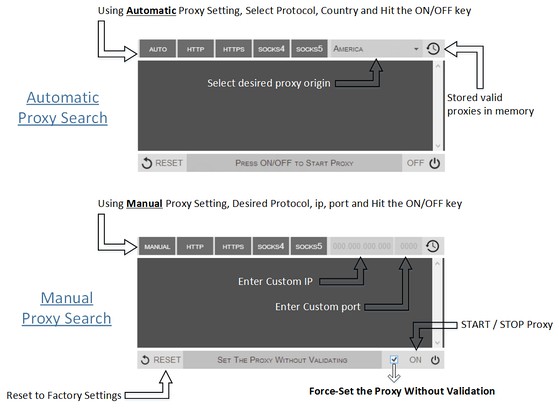

Informácie o rozšírení
- Počet stiahnutí
- 88 676
- Kategória
- Produktivita
- Verzia
- 0.1.3
- Veľkosť
- 52,8 KB
- Last update
- 9. september 2014
- Licencia
- Copyright 2014 philiptholus
Related
-

InoReader Sidebar
Mobile version Inoreader.com on sidebar (not official)
-

Evernote Web Clipper
Use the Evernote extension to save things you see on the web into your Evernote account.
-

How many Millions in a Billion
Convert among large number like million, billion, trillion and so no...
-

YouTube™ No Buffer (Stop Auto-playing)
Prevents YouTube HTML5 and Flash players from auto-buffering (auto-playing) videos
-

Atavi bookmarks
Vizuálne záložky, synchronizácia záložiek medzi rôznymi prehliadačmi a absolútna bezpečnosť pre vaše záložky