Požaduje sa prehliadač Opera.
Open in PDF Viewer is a simple and very lite addon that allows you to easily open desired PDF links in a chosen PDF viewer.
Note 1: after installing the addon, you need to connect it with native applications (i.e. adobe acrobat reader) on your machine. In order to make this connection, a separate patch is provided in GitHub. Please download and install this patch from: https://github.com/alexmarcoo/open-in-native-client/releases
Follow the instructions in the above GitHub page to download and install the related patch to your system. After installing, the "Open in PDF Viewer" addon in your browser can communicate with PDF viewer on your machine (Window, Linux or Mac).
Default option for the PDF viewer is adobe acrobat reader. In windows 10, the default location for Adobe Acrobat is "C:\Program Files (x86)\Adobe\Acrobat Reader DC\Reader\AcroRd32.exe". If you have a different OS, or if you installed Adobe Acrobat in a different folder, please adjust the field accordingly. You can change this from the options page.
There is also an input field which you can add arguments for the viewer. For example, to open PDF as full-screen or without toolbar. Please note that, if you change the PDF viewer make sure to change the input arguments as well. Each PDF viewer has its own arguments to operate. If you keep Adobe as the default PDF viewer, please visit this page (http://www.adobe.com/content/dam/Adobe/en/devnet/acrobat/pdfs/pdf_open_parameters.pdf) to get more info about input arguments.
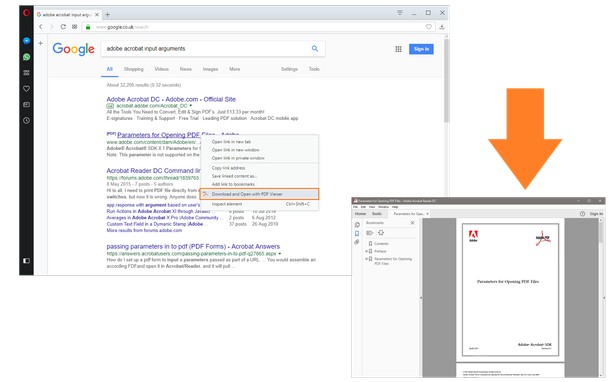
In order to operate with this addon, please right-click on any link (a link to a PDF document) and then click on - Open and Download with PDF Viewer - item from the context-menu. The PDF file will first be "downloaded" and then "opened" in a default PDF viewer (the one which is set in the options page). Please note that, the PDF file will be downloaded in the "default" download folder in your machine.
Note 2: before using the addon, please open the option's page and make sure the path to the PDF viewer is correct based on your Operating System.
In order to report any bug, please fill the bug report form in the addon's homepage (http://mybrowseraddon.com/open-in-pdf.html).
- This extension can exchange messages with programs other than Opera.
- This extension can create rich notifications and display them to you in the system tray.
Snímka
Informácie o rozšírení
- Počet stiahnutí
- 102 836
- Kategória
- Produktivita
- Verzia
- 0.1.5
- Veľkosť
- 15,7 KB
- Last update
- 27. január 2025
- Licencia
- Copyright 2025 alexmarcoo
- Stránka podpory
- https://mybrowseraddon.com/open-in-pdf.html
Related
-
Snip Shot
Snip Shot is a user-friendly browser extension that simplifies the process of taking screenshots. With its one-click operation and intuitive user interface, users can quickly and easily capture any part of their screen and save it as an image. Snip Shot's minimalist design makes it a seamless addition to any browser, while its efficiency and usability make it the perfect tool for anyone who needs to take screenshots regularly.
Hodnotenie: Celkový počet hodnotení: 3
-
VertoUnit - Unit Converter
VertoUnit is a practical tool for converting measurement values with precision and ease, ensuring accurate calculations directly in your browser. It’s designed to provide quick, reliable results through a clean and minimal interface.
Hodnotenie: Celkový počet hodnotení: 2
-
Atavi bookmarks
Vizuálne záložky, synchronizácia záložiek medzi rôznymi prehliadačmi a absolútna bezpečnosť pre vaše záložky
Hodnotenie: Celkový počet hodnotení: 173
-
CPS Tap Counter - Count taps
Track your Spacebar counts with Tap Counter Opera Extension.
Hodnotenie: Celkový počet hodnotení: 1
-
Evernote Web Clipper
Use the Evernote extension to save things you see on the web into your Evernote account.
Hodnotenie: Celkový počet hodnotení: 636