Požaduje sa prehliadač Opera.
HTML5 Editor with CSS, JS, HTML validator and beautify code
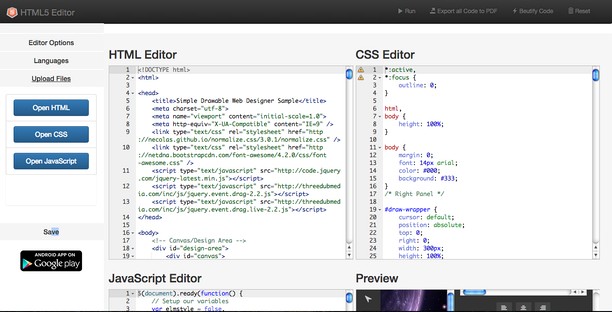
Edit your files html, css and javascript directly into your browser Opera, save each one in your file system. Open each one file with useful upload groups button and if you want export entire code project in pdf. Validate your code css and js in realtime and with just one click beautify it to render design more readable.
===========================
Release 1.7.5 - Updated jszip library and fixed function to download project
Release 1.7.0 - Added in context menu FTP online manager with secure and private connection (https)
Release 1.6.0 - Added "Detect my Browser" function in context menu
Release 1.5.0 - Added "Can I use" button to get support about HTML5 web elements
Release 1.4.0 - Now, directly in yours web projects, you can use HTML5 APIs FileSystem to save code
Release 1.3.0 - Export your project in zip and, if you want, you can convert it to native app with WebDGap online service
===========================
Features
- Save in single files the code css, javascript and html
- Export the entire code project to pdf
- Import files CSS, JavaScript and HTML in their respective box
- Beautify the entire code project in just one click
- CSS and JavaScript validation code in real time
- Preview web design
- Get HTML and CSS of web element from context menu
- Toto rozšírenie má prístup k vašim dátam na všetkých webových stránkach.
- Toto rozšírenie má prístup k vašim listom a aktivite prehliadania.
Snímky
Informácie o rozšírení
- Počet stiahnutí
- 164 946
- Kategória
- Developer Tools
- Verzia
- 1.8.0
- Veľkosť
- 864,7 KB
- Last update
- 26. november 2018
- Licencia
- Webová lokalita služby
- https://www.mediamaster.eu/
- Stránka podpory
- https://www.mediamaster.eu/contatti
Related
-
Web Widgetizer
Web Widgetizer is a extension offering a range of features to enhance browsing. It allows users to create separate Opera windows for specific websites, manage favorite links, customize window dimensions, toggle auto-start, and open links in popup tabs via button click or shortcut (Ctrl + Shift + A). This versatile tool optimizes browsing convenience and efficiency.
Hodnotenie: Celkový počet hodnotení: 2
-
Copy Title And Url
Copy the title and url in markdown, pukiwiki, html format.
Hodnotenie: Celkový počet hodnotení: 1
-
Web Developer
Adds a toolbar button with various web developer tools. The official port of the Web Developer extension for Firefox.
Hodnotenie: Celkový počet hodnotení: 112
-
JSON Lite
Fast JSON viewer - highlights, shows items count/size, handles large files
Hodnotenie: Celkový počet hodnotení: 34
-
Rabbit URL Opener
Rabbit URL Opener (Rahul Digital) - Bulk URL's Opener Extension just lets you open multiple URLs at once. More about Rabbit URL Opener http://rahuldigital.org/url-opener/ http://rahuldigital.com/url-opener/
Hodnotenie: Celkový počet hodnotení: 5