Необходим браузер Opera.
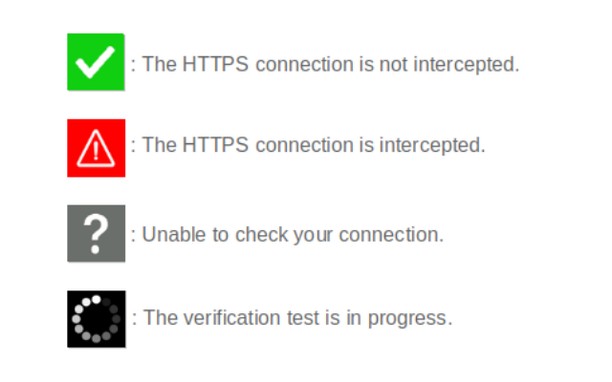
When browsing on secured sites ("https://..." websites), you can check the security status by clicking on the extension icon.
- The icon is green : your connection is not compromised;
- The icon is red : your connection is considered very risky (hijacked, modified, listened);
- The icon is gray : the verification is impossible (check server is unreachable, network error);
- The icon is black : the verification is in progress.
Technical details :
Normally, before encrypting an HTTPS connection, a secure website must prove its identity to your browser by sending it its security certificate. This certificate can be considered as an identity card issued by higher authorities (Certificate Authorities). There are several techniques of usurpation based on false certificates (false identity cards) or homographers (false names) to make you believe that a pirate site is the legitimate site you think you are visiting. These techniques allow pirate sites to retrieve your private information.
CheckMyHTTPS allows you to detect this type of practice, which can be implemented on open networks (WiFi in hotels, conference centers, stations, etc.) or even within your company via its firewall (SSL inspection). To detect this, the extension compares the certificate of the visited site that is received by your browser with the same certificate retrieved by an external check server located on the Internet. If the certificates differ, the identity of the server can be considered as usurped (red icon).
Respect for privacy :
The CheckMyHTTPS extension requires to send only two parameters to the check server :
- The domain name of the visited website;
- The IP address of the visited website.
You have free choice regarding the website to check.
Moreover, we give you the possibility to be free regarding the check server as you can make and host your own.
All explanations are detailed on the https://checkmyhttps.net project website.
- У этого расширения есть доступ к вашим данным на всех сайтах.
- This extension can create rich notifications and display them to you in the system tray.
- У этого расширения есть доступ к вашим вкладкам и действиям в интернете.
Снимки
О расширении
- Загрузки
- 1 625
- Категория
- Продуктивная работа
- Версия
- 5.7.3
- Размер
- 316,1 КБ
- Обновлено
- 13 марта 2026 г.
- Лицензионное соглашение
- Политика конфиденциальности
- Cайт службы
- https://checkmyhttps.net/
- Страница поддержки
- https://github.com/checkmyhttps/checkmyhttps/issues
- Страница исходного кода
- https://github.com/checkmyhttps/checkmyhttps/tree/master/Chromium
Похожие
-
Sound Meter (Noise & Decibel)
Measure the surrounding sound (dB) and noise with your computer's microphone!
Оценка: Всего оценок: 4
-
Unhook - Remove YouTube Recommended Videos
Hide YouTube related videos, comments, shorts tab, suggestions wall, homepage recommendations, trending, and other distractions.
Оценка: Всего оценок: 74
-
Evernote Web Clipper
Используйте расширение Evernote, чтобы сохранять интересные материалы из Интернета прямо в свой аккаунт Evernote.
Оценка: Всего оценок: 555
-
Atavi bookmarks
Визуальные закладки, надежная сохранность и синхронизация закладок между браузерами
Оценка: Всего оценок: 160
-
Free Online Image Resizer
Free Online Image Resizer is a lightweight browser extension that allows you to quickly resize images without leaving your browser. With an elegant, user-friendly interface, you can adjust image dimensions with just a few clicks and download the resized images instantly. Perfect for social media posts, web graphics, or any situation where you need to quickly adjust image sizes.
Оценка: Всего оценок: 2