É necessário o browser Opera.
Window Resizer is an addon that lets you easily re-size and re-position the current window to your desired values.
Simply open toolbar popup UI and click on the desired layout set (size & position). Once you click a layout, the window will be positioned and resized to the chosen layout. There are 20 predefined layouts available to choose from in the toolbar popup.
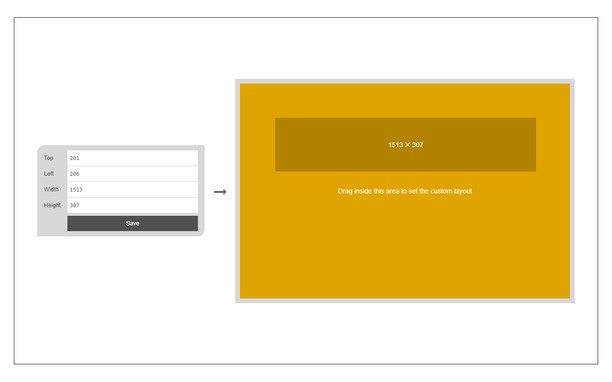
If you need a custom layout, please click on the - Add a new layout - button at the top left corner in popup UI. A new tab will be open with a custom design layout UI. Simply drag your desired size within the orange area, then click on the - Save - button to store the custom layout. The new layout will be added to the popup UI.
Note 1: icons within toolbar popup UI are draggable and the new order will be auto-saved to the memory.
Note 2: to report bugs, please fill the bug report form on the addon homepage (https://mybrowseraddon.com/window-resizer.html).
Imagens
Sobre a extensão
- Transferências
- 20.452
- Categoria
- Produtividade
- Versão
- 0.1.6
- Tamanho
- 45,4 KB
- Última actualização
- 31 de Março de 2023
- Licença
- Copyright 2023 kelvinbarko
- Página de ajuda
- https://mybrowseraddon.com/window-resizer.html
Relacionado
-
iFrame - Link Viewer
Preview any link and search any text in a popup iFrame
Avaliação: Número total de avaliações: 31
-
Atavi bookmarks
Favoritos em formato visual, sincronizados em vários navegadores e segurança completa para seus favoritos
Avaliação: Número total de avaliações: 173
-
Evernote Web Clipper
Use a extensão do Evernote para guardar as coisas que você vê na web na sua conta do Evernote.
Avaliação: Número total de avaliações: 632
-
Data Converter
Convert Kilobytes to Bytes and vice versa in one click
Avaliação: Número total de avaliações: 1
-
IdleSwitcher
Auto-switches to a preset tab or cycle through tabs after the user becomes inactive.
Avaliação: Número total de avaliações: 1