Wymagana przeglądarka Opera.
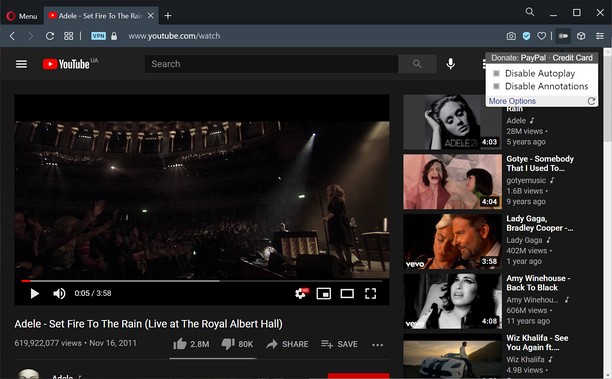
Turn off YouTube autoplay or turn off YouTube annotations. Also hides the toggle option when disabled.
Compatible with mobile and embedded YouTube videos as well.
For more features including removing recommendations, comments, and more, try the Unhook YouTube add-on: https://chrome.google.com/webstore/detail/unhook-remove-youtube-rec/khncfooichmfjbepaaaebmommgaepoid
Turn Off YouTube Autoplay Next & Annotations is available on:
- Opera: https://addons.opera.com/en/extensions/details/turn-off-youtube-autoplay-next-annotations/
- Chrome: https://chrome.google.com/webstore/detail/turn-off-youtube-autoplay/pcapooophggbaedfdmmmmbldmhlbbjob
- Firefox: https://addons.mozilla.org/firefox/addon/youtube-autoplay-annotations/
- Microsoft Edge: https://microsoftedge.microsoft.com/addons/detail/turn-off-youtube-autoplay/apdogalndjbldgojpfofdcdlmblgpjef
- To rozszerzenie może uzyskać dostęp do Twoich danych na niektórych witrynach.
Zrzuty ekranu
O rozszerzeniu
- Liczba pobrań
- 2 235
- Kategoria
- Produktywność
- Wersja
- 1.0.8
- Rozmiar
- 11,3 KB
- Ostatnia aktualizacja
- 20 stycznia 2023
- Licencja
- Polityka prywatności
- Witryna usługi
- https://unhook.app/
Pokrewne
-
Desktop Screen Record
Record the computer's screen, entire application or a single browser tab with audio support
Ocena: Całkowita liczba ocen: 32
-
Boomerang for Gmail™
Allows you to schedule messages to be sent or returned at a later date.
Ocena: Całkowita liczba ocen: 46
-
Audio Converter
Convert any audio file to selected formats (i.e. mp3) inside your browser!
Ocena: Całkowita liczba ocen: 8
-
QR – QR Codes
Show QR code™ representing url of current tab or right clicked link
Ocena: Całkowita liczba ocen: 23
-
Evernote Web Clipper
Użyj rozszerzenia Evernote do zapisywania treści z internetu na koncie Evernote.
Ocena: Całkowita liczba ocen: 549