Penyemak imbas Opera diperlukan.
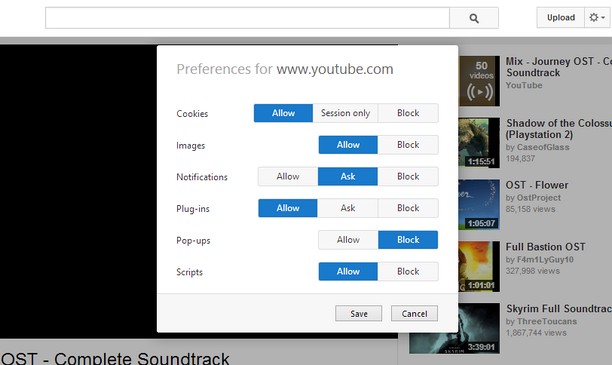
Site-specific Preferences brings back some of Opera 12's features for changing per-site settings. It lets you set whether Opera allows or blocks different types of content, such as plug-ins and pop-ups, for each site.
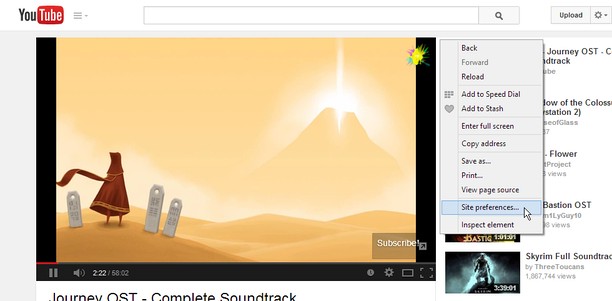
Just right-click the page background and select "Site preferences" to open the preferences for that site.
Using a certain, famous key sequence on the options page will let you allow, block or enable Click to play for individual plug-ins. This feature is experimental and might break things, so use it at your own risk.
Known Issues:
- Extensions are blocked on the Opera add-ons site, so the extension will not work here.
- The extensions API does not provide extensions with a list of the sites they have customized, so I cannot provide a centralized place to edit settings for multiple sites like in Opera 12's options page.
- Sambungan ini dapat mengakses data anda di semua laman web.
- Sambungan ini dapat memanipulasi tetapan yang menentukan sama ada laman web boleh menggunakan ciri seperti kuki, JavaScript dan pemalam
- Sambungan ini dapat mengakses aktiviti tab dan semakan imbas anda.
Petikan skrin
Mengenai sambungan
- Muat turun
- 14,345
- Kategori
- Produktiviti
- Versi
- 1.2
- Saiz
- 45.8 KB
- Last update
- 18 Ogo 2014
- Lesen
- Halaman sokongan
- https://github.com/ChaosinaCan/SitePreferences/issues
- Halaman kod sumber
- https://github.com/ChaosinaCan/SitePreferences
Related
-
Lunapic Right Click Edit
Easy way to edit images on Lunapic.com. Right click an image and open edit session on Lunapic.com.
Penarafan: Jumlah bilangan penarafan: 5
-
Edit with Notepad++
Edit content of text area elements, or inner and outer HTML of node elements in Notepad++ text editor with real-time updates
Penarafan: Jumlah bilangan penarafan: 2
-
Atavi bookmarks
Visual bookmarks, bookmarks sync across various browsers and absolute safety for your bookmarks
Penarafan: Jumlah bilangan penarafan: 176
-
About://Internal Pages
Shows a menu with all internal pages. Ex: about:about, about:plugins...
Penarafan: Jumlah bilangan penarafan: 118
-
Evernote Web Clipper
Gunakan sambungan Evernote untuk menyimpan bahan yang anda lihat di web ke dalam akaun Evernote anda.
Penarafan: Jumlah bilangan penarafan: 630