Penyemak imbas Opera diperlukan.
Preview any link in a pop-up frame without leaving current page (instead of opening a new tab), eliminating the need to go back and forth to navigate to other links. Very useful for exploring Google search results, Craigslist, Instagram, news feeds, etc. Also, search any text without leaving current page to look up for references, definitions, etc.
How to use the iFrame - Link Viewer extension:
1. Hover any link to show a tiny box on the right of the link
2. Click the tiny box to open an iFrame to preview the link
3. Drag the top bar to move the iFrame, drag the right bottom corner to resize it
4. Click outside the iFrame to close it
5. Text Search mode: Select any text to search, and click the tiny box to open search pop-up frame
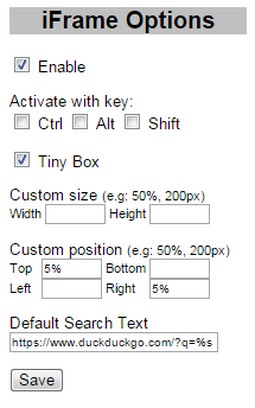
6. Option page on browser toolbar button:
- Enable/Disable
- Activate with Ctrl/Alt/Shift Key or their combination
- Show Tiny Box on link or directly show the iFrame link preview
- Custom size and position
- Default search text (leave blank to disable)
Search query examples: (don't forget %s)
https://www.google.com/search?q=%s
Note:
- Some websites do not allow to be opened in iframe, e.g: Stackoverflow
- When browsing through Google search results (or other secure sites using https), you might get "Blocked insecure content" warning, you need to Unblock the warning to allow iFrame to load previewed sites
- Sambungan ini dapat mengakses aktiviti tab dan semakan imbas anda.
Petikan skrin
Mengenai sambungan
- Muat turun
- 18,134
- Kategori
- Produktiviti
- Versi
- 0.8
- Saiz
- 9.5 KB
- Last update
- 25 Ogo 2016
- Lesen
- Copyright 2016 mataherry
- Halaman sokongan
- http://mataherry.blogspot.com/2011/10/iframe-opera-extension-updated-for.html
- Halaman kod sumber
- https://github.com/mataherry/iFrame/
Related
-
Atavi bookmarks
Visual bookmarks, bookmarks sync across various browsers and absolute safety for your bookmarks
Penarafan: Jumlah bilangan penarafan: 160
-
Evernote Web Clipper
Gunakan sambungan Evernote untuk menyimpan bahan yang anda lihat di web ke dalam akaun Evernote anda.
Penarafan: Jumlah bilangan penarafan: 553
-
Notifier for Outlook™
The easiest way to check and open your Outlook inbox while you browse internet.
Penarafan: Jumlah bilangan penarafan: 31
-
Image Size Converter
Image Size Converter is a powerful yet user-friendly Opera extension that allows you to quickly resize images right in your browser. With an elegant interface and intuitive controls, you can modify image dimensions, choose output formats, and adjust quality settings with just a few clicks - all without relying on external websites or applications.
Penarafan: Jumlah bilangan penarafan: 1
-
Picky
More visibility to what's more relevant. Ignore what you don't want to see.
Penarafan: Jumlah bilangan penarafan: 2