Opera 브라우저가 필요합니다.
ZIP Reader is an add-on that help you easily unzip a compressed file.
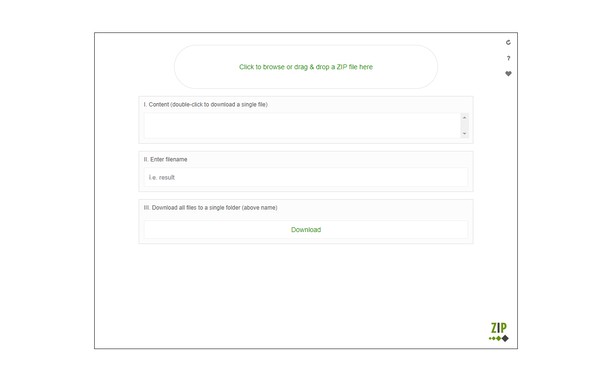
Simply drag & drop a zipped file to a designated area in the app UI (top section). All the zip content will be listed in the UI. You can download each individual file by clicking on it or download all files to single folder.
Note #1: this add-on is only designed for "reading" a ZIP file. For the inverse operation (zip a folder), you need to use a different application. There is also a reload button at the top left corner in the app UI. Clicking on this button will reload the app. If you want to extract multiple zip files, please do this one by one. It is also recommended to reload the UI after each unzip operation.
Note #2: this add-on is using an open-source JavaScript library for the unzip operation. You can get more info about this library at here: https://github.com/gildas-lormeau/zip.js/tree/master/WebContent
If you see any bug, or have a feature request in mind, please fill the bug report form in the add-on's homepage (https://mybrowseraddon.com/zip-reader.html).
스크린샷
확장 기능 정보
- 다운로드 횟수
- 10,234
- 범주
- 생산성
- 버전
- 0.1.4
- 크기
- 53.6 KB
- 최종 업데이트 일
- 2022년 12월 19일
- 라이선스
- Copyright 2020 loorisvalf
- 지원 페이지
- https://mybrowseraddon.com/zip-reader.html
Related
-
Evernote Web Clipper
Evernote 확장 프로그램을 사용해 웹에서 본 정보를 Evernote 계정에 저장하세요.
등급: 총 등급 수: 537
-
Library Access
A library-approved tool to unlock access to academic papers.
등급: 총 등급 수: 9
-
Boomerang for Gmail™
Allows you to schedule messages to be sent or returned at a later date.
등급: 총 등급 수: 48
-
Window Resizer
Resize and align the current window to the predefined position with multi-monitor support
등급: 총 등급 수: 3
-
TickTick for Opera Sidebar (Unofficial Extension)
TickTick for Opera Sidebar. Unofficial Extension
등급: 총 등급 수: 31