Opera 브라우저가 필요합니다.
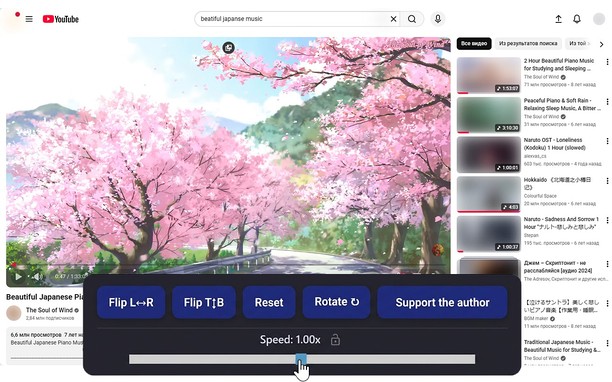
Reflects video vertically and horizontally, speeds up or slows down playback, rotates by 90°, and compresses video height and width — useful for fixing distorted videos.
How it works
Hotkeys:
Alt + * (NumPad): Show/hide control panel.
Alt + 1 / 3 (NumPad): Decrease or increase playback speed (step 0.01).
🔒 Lock near the speed — if you click it, it will remember any changed speed for the entire domain.
Alt + 4 / 6 (NumPad): Compress or stretch the frame horizontally.
Alt + 2 / 8 (NumPad): Compress or stretch the frame vertically.
Alt + 5 (NumPad): Reset all settings.
Alt + 7 (NumPad): Decrease frame size on both axes.
Alt + 9 (NumPad): Increase frame size on both axes.
Alt + 0 (NumPad): Rotate video 90°.
Compatibility:
Works on almost all sites.
Works in full-screen mode.
- 이 확장 기능은 모든 웹 사이트의 데이터에 액세스할 수 있습니다.
스크린샷
확장 기능 정보
- 다운로드 횟수
- 8,857
- 범주
- 생산성
- 버전
- 1.4.0
- 크기
- 60.3 KB
- 최종 업데이트 일
- 2026년 2월 17일
- 라이선스
- 개인 정보 보호 정책
Related
-
Best showeres
Whether you're seeking relaxation, invigoration, or convenience, there's a shower option available to elevate your daily routine and create a refreshing oasis in your bathroom..
등급: 총 등급 수: 2
-
Atavi bookmarks
모든 장치와 브라우저에서 북마크 동기화
등급: 총 등급 수: 171
-
Screenshot YouTube Video
YouTube 및 OK.ru 비디오의 화면을 한 번의 클릭으로 JPEG 형식으로 빠르게 저장한다.
등급: 총 등급 수: 183
-
Proxy Finder (IP Switcher)
Change your geo-location with one click
등급: 총 등급 수: 12
-
Evernote Web Clipper
Evernote 확장 프로그램을 사용해 웹에서 본 정보를 Evernote 계정에 저장하세요.
등급: 총 등급 수: 634