Opera 브라우저가 필요합니다.
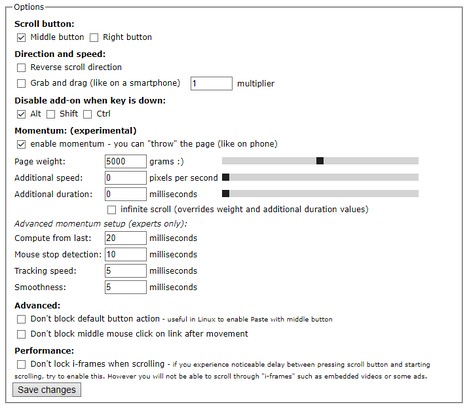
Scroll Anywhere enables you to drag scrollbar with your middle (or right) mouse button without touching a scrollbar.
Just hold the middle button and move mouse up-down or left-right.
You can also change the behavior to simple "grab and drag" style.
Supports also Momentum - ability to throw the page (like on your phone) - including infinite scrolling option.
Now with the option to change the cursor while scrolling!
Warning: very addictive! :)
Preview: https://fastaddons.com
Known issues:
- does not work HERE on https://addons.opera.com/en/extensions/ (blocked by Opera)
- does not work on browser specific pages like "History" or "Extensions" (blocked by Opera)
- does not work on other extensions pages like options page of some addon (blocked by Opera)
- in Linux right click (context menu) cannot be canceled so only middle button is working correctly
Note:
I'm developing this add-on in my free time for you for free.
Please consider supporting my work by becoming my patron:
https://www.patreon.com/fastaddons
Or by donation:
https://paypal.me/fastaddons
Thank you :)
- 이 확장 기능은 모든 웹 사이트의 데이터에 액세스할 수 있습니다.
스크린샷
확장 기능 정보
- 다운로드 횟수
- 18,465
- 범주
- 생산성
- 버전
- 6.5.2
- 크기
- 111.6 KB
- 최종 업데이트 일
- 2019년 4월 11일
- 라이선스
- 개인 정보 보호 정책
- 지원 페이지
- https://fastaddons.com/
Related
-
Print Selection to PDF
Select a text and print it to PDF with mouse right-click
등급: 총 등급 수: 8
-
MConverter - File Converter
AVIF, WebP를 JPG 또는 PNG로 저장합니다. 웹페이지에서 이미지, 비디오, 오디오를 변환합니다. 비디오에서 애니메이션 GIF를 만듭니다. PDF 파일을 압축합니다.
등급: 총 등급 수: 18
-
Simple Video Speed Controller
Automatically adjust video speed on any website.
등급: 총 등급 수: 5
-
Evernote Web Clipper
Evernote 확장 프로그램을 사용해 웹에서 본 정보를 Evernote 계정에 저장하세요.
등급: 총 등급 수: 632
-
Atavi bookmarks
모든 장치와 브라우저에서 북마크 동기화
등급: 총 등급 수: 173