Opera 브라우저가 필요합니다.
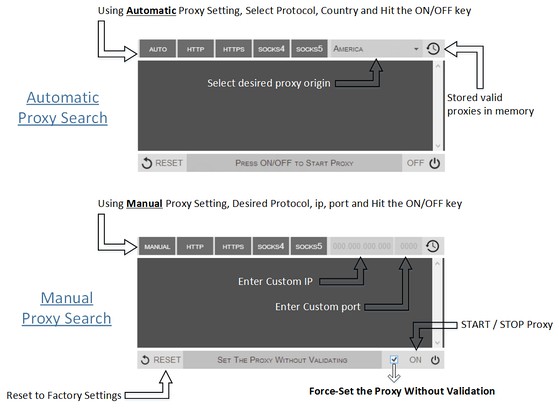
Proxy Finder (IP Switcher) is an Opera extension which automatically switches an Internet connection across one or more proxy servers. Put simply, Proxy Finder automates the manual process of editing Opera's Proxy Settings dialog. Proxy server switching occurs based on the Manual or Automatic mode you define.
In the manual mode (default) you need to choose a protocol (http, https, socks4, or socks5) and enter a desired IP and Port, then press ON/OFF button to start the proxy. For the automatic mode, the extension uses its online server to search for a working proxy based on the protocol(s) and origin you have chosen.
Moreover, animated icons show you when a proxy is in use. Advanced logging shows you which proxies were used. If you have any question or concern, feel free to contact me via the following address: philip[dot]tholus[at]gmail.com
- 이 확장 기능은 모든 웹 사이트의 데이터에 액세스할 수 있습니다.
- 이 확장 기능은 확장 기능을 관리해 줍니다.
- 이 확장 기능은 프록시 설정에 액세스할 수 있습니다.
- 이 확장 기능은 탭 및 탐색 활동에 액세스할 수 있습니다.
스크린샷
확장 기능 정보
- 다운로드 횟수
- 84,174
- 범주
- 생산성
- 버전
- 0.1.3
- 크기
- 52.8 KB
- 최종 업데이트 일
- 2014년 9월 9일
- 라이선스
- Copyright 2014 philiptholus
Related
-
Skim the clipboard
Clipboard filtering with regular expression
등급: 총 등급 수: 1
-
Evernote Web Clipper
Evernote 확장 프로그램을 사용해 웹에서 본 정보를 Evernote 계정에 저장하세요.
등급: 총 등급 수: 633
-
Atavi bookmarks
모든 장치와 브라우저에서 북마크 동기화
등급: 총 등급 수: 171
-
Dcurrency
Currency rates on web pages
등급: 총 등급 수: 5
-
Kodebrikkesjekken
Kodebrikkesjekken protects against fraud and ID theft for Norwegian BankID
등급: 총 등급 수: 2