Opera 브라우저가 필요합니다.
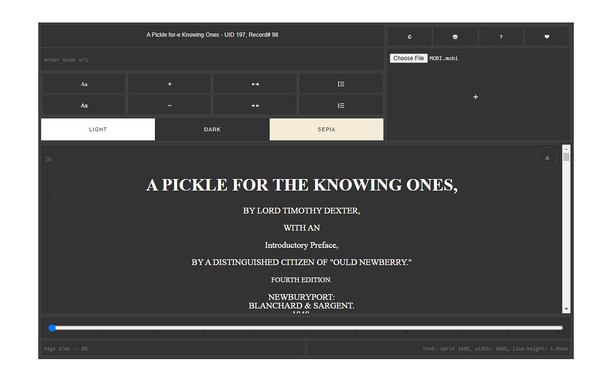
MOBI Reader is a simple and powerful extension that can open any document with a mobi (or kindle) file extension.
Please right-click on any ".mobi" link and then click on the - View MOBI - item from the context menu. Alternatively, you can open the popup window and then add the mobi link in the UI to view the document. For offline files, simply drag the file to the designated area in the popup to load the mobi document. This add-on has a dark mode to better read mobi files at night time. Moreover, you can resize the window to your desired size and the document will adapt itself to the new size.
Note 1: MOBI is a new e-book file format for viewing online or offline documents. MOBI file format is designed for Kindle devices and created by Amazon company.
Note 2: this add-on uses an open-source JavaScript library called mobi.js to render the ".mobi" file format (https://github.com/woshifyz/mobi_reader/blob/master/mobi.js)
If you have a feature request or found a bug to report, please fill the bug report form on the addon's homepage (https://mybrowseraddon.com/mobi-reader.html).
- 이 확장 기능은 모든 웹 사이트의 데이터에 액세스할 수 있습니다.
스크린샷
확장 기능 정보
- 다운로드 횟수
- 1,879
- 범주
- 생산성
- 버전
- 0.1.3
- 크기
- 32.2 KB
- 최종 업데이트 일
- 2023년 2월 23일
- 라이선스
- Copyright 2021 sevinalucia
- 지원 페이지
- https://mybrowseraddon.com/mobi-reader.html
Related
-
Atavi bookmarks
모든 장치와 브라우저에서 북마크 동기화
등급: 총 등급 수: 173
-
Evernote Web Clipper
Evernote 확장 프로그램을 사용해 웹에서 본 정보를 Evernote 계정에 저장하세요.
등급: 총 등급 수: 631
-
GitHub Hovercard
Neat hovercards for GitHub.
등급: 총 등급 수: 31
-
Addon Manager with Profiling
Manage your addons on multiple profiles from a toolbar panel
등급: 총 등급 수: 2
-
Free Online Image Resizer
Free Online Image Resizer is a lightweight browser extension that allows you to quickly resize images without leaving your browser. With an elegant, user-friendly interface, you can adjust image dimensions with just a few clicks and download the resized images instantly. Perfect for social media posts, web graphics, or any situation where you need to quickly adjust image sizes.
등급: 총 등급 수: 2