Opera 브라우저가 필요합니다.
Stop copying and pasting prompts. Managing your AI templates in scattered text files or Notion documents ruins your workflow. Hunting for placeholder brackets and manually dragging the same reference files into new chats is a waste of time.
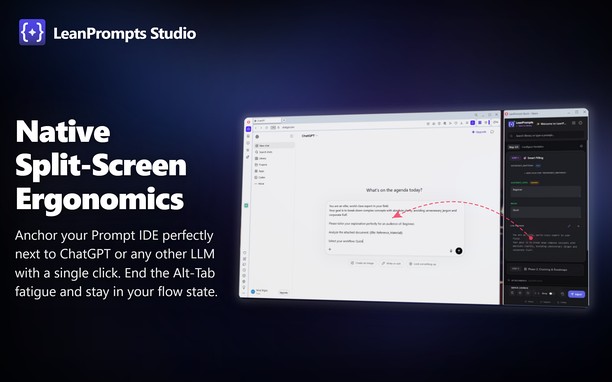
LeanPrompts Studio is a professional, local-first Prompt IDE that turns your AI interfaces into an execution engine. It separates prompt design from execution, letting you compile templates and inject them directly into ChatGPT, Claude, Gemini, DeepSeek, and others. The extension interface consists of a clean, dark-themed control center dashboard and a compact sidebar popup that docks beside your browser window.
How to use:
Simply open the LeanPrompts sidebar popup or use the global keyboard shortcut (Alt+Shift+Q) while visiting your favorite AI website. Select a prompt from your library, fill out any auto-generated variable fields, attach your files, and click "Inject" to instantly populate the AI input field and start the chat.
Key Features:
- Direct DOM Injection: Populates text fields and uploads files directly inside the active LLM tab, bypassing the system clipboard. Natively supports local offline Web-UIs like Ollama, LM Studio, and Jan.ai.
- Dynamic Templates: Define variables like {{Topic}} or dropdowns to auto-generate clean data-entry forms in your sidebar.
- Modular Snippets (@): Save personas or formatting rules as global snippets. Update them once, and they update in all templates.
- Prompt Chaining: Split complex tasks into sequential steps and inject them one-by-one to guide the AI and reduce hallucinations.
Privacy:
LeanPrompts requires no cloud accounts, no API keys, and stores all data entirely offline on your local machine.
Future Versions:
Planned updates for the optional Pro version include cross-device cloud synchronization and collaborative team workspaces, while the offline core remains entirely free.
- 이 확장 기능은 모든 웹 사이트의 데이터에 액세스할 수 있습니다.
- 이 확장 기능은 탭 및 탐색 활동에 액세스할 수 있습니다.
- This extension can store an unlimited amount of client-side data.
스크린샷
확장 기능 정보
- 다운로드 횟수
- 6
- 범주
- 생산성
- 버전
- 1.0.1
- 크기
- 589.0 KB
- 최종 업데이트 일
- 2026년 6월 15일
- 라이선스
- Copyright 2026 16598d44-cbdd-4746-91a5-e812ae6eac9b
Related
-
Evernote Web Clipper
Evernote 확장 프로그램을 사용해 웹에서 본 정보를 Evernote 계정에 저장하세요.
등급: 총 등급 수: 630
-
Custom UserAgent String
Add a custom useragent string for desired URLs or domains.
등급: 총 등급 수: 16
-
Fastest Notifier for Yahoo™ Mail
Yahoo™ Notifier Pro is the easiest way to check Yahoo's unread emails from a toolbar panel
등급: 총 등급 수: 19
-
Atavi bookmarks
모든 장치와 브라우저에서 북마크 동기화
등급: 총 등급 수: 175
-
Simple Photo Editor
Your easy and simple photo editor for your Browser
등급: 총 등급 수: 5