Opera 브라우저가 필요합니다.
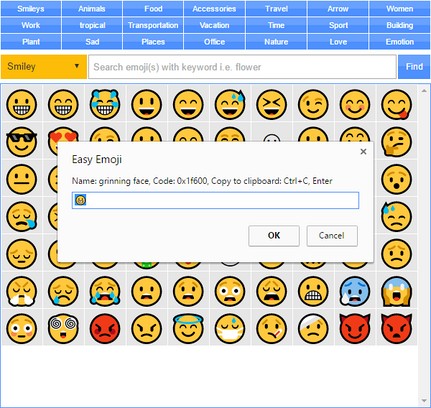
Easy Emoji addon lets you find and copy desired emoji from your Opera's toolbar popup UI with just one click.
Some important features:
1. Over 1800 emojis to choose from.
2. Toolbar popup has a built-in finder to search and find desired emojis.
3. Click on each emoji to see details and copy the icon to clipboard.
4. No settings or options to adjust.
Note 1: in order to copy each emoji icon, simply click on it. The emoji will be copied to the clipboard automatically.
Note 2: depending on your browser's version and operating systems, some emoji icons may not render properly.
Note 3: in order to report bugs, please fill the bug report form in the addon's homepage (http://mybrowseraddon.com/easy-emoji.html).
- This extension can write data into the clipboard.
스크린샷
확장 기능 정보
- 다운로드 횟수
- 16,495
- 범주
- 쇼셜
- 버전
- 0.1.3
- 크기
- 52.9 KB
- 최종 업데이트 일
- 2019년 8월 2일
- 라이선스
- Copyright 2019 moristong
- 지원 페이지
- http://mybrowseraddon.com/easy-emoji.html
Related
-
Google™ Plus Notifier
Google™ Plus is a place to connect with friends and family while you browse internet
등급: 총 등급 수: 2
-
Geocaching.com Friends Logs
Shows your friends logs at the top of the window, so you don't need to View logbook>friends logs on every cache.
등급: 총 등급 수: 1
-
Remark
Uncensored Comments, anywhere.
등급: 총 등급 수: 1
-
Better Drive Chat
Emotes and images in Google Docs chat.
등급: 총 등급 수: 1
-
Mention It
Replace Twitter's Moments tab with a Mentions tab
등급: 총 등급 수: 1