Opera 브라우저가 필요합니다.
Key Features
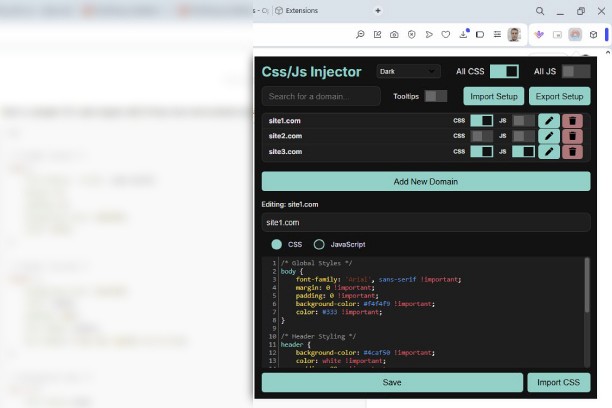
- Custom CSS & JavaScript Injection: Add and manage CSS/JS scripts for individual domains.
- Global Toggles: Quickly enable or disable all custom styles or scripts with one click.
- Export/Import Setup: Backup and share your configurations effortlessly in JSON format.
- Code Editing Tools: Enjoy features like syntax highlighting, autocompletion, and auto-indentation using the CodeMirror editor.
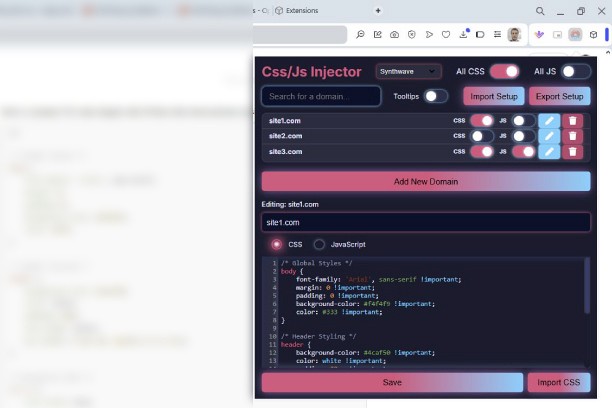
- Dynamic Themes: Choose from a variety of themes, including Dark Mode, Synthwave, Vaporwave, and more.
- Domain-Specific Control: Easily switch styles or scripts on and off for specific domains.
- Tooltip Assistance: Detailed tooltips for all major functionalities to guide you through usage.
- Secure Script Execution: Execute your custom scripts safely without interference.
How to Use
1. Install the Extension: Add the CSS & JS Injector to your browser from the Chrome or Opera Web Store.
2. Open the Extension: Click the extension icon to access the popup interface.
3. Select a Domain:
- Use the domain list to manage existing domains or add a new one.
4. Edit Styles or Scripts:
- Choose between CSS and JavaScript modes using the toggle.
- Write your code in the editor with real-time syntax highlighting.
5. Save and Apply:
- Save your changes, and they will be automatically applied to the domain.
Disclaimer
This extension is provided as-is, without warranty of any kind. Users are solely responsible for the code they inject into websites.
Licenses
This extension uses the following third-party libraries:
CodeMirror:
Homepage: https://codemirror.net/
License: MIT
License Text: Available in libs/codemirror/LICENSE.
Font Awesome:
Homepage: https://fontawesome.com/
License: Free version is licensed under the CC BY 4.0 license.
- 이 확장 기능은 모든 웹 사이트의 데이터에 액세스할 수 있습니다.
스크린샷
확장 기능 정보
Related
-
Pixel converter
Pixel converter is a crucial web development and design tool for converting pixel values into different measurement units like inches, centimeters, or percentages, ensuring consistency across diverse devices and screens in responsive web design.
등급: 총 등급 수: 1
-
Wayback machine website
Online service that have 452 billion web pages saved over time and who is domain tool in context menu
등급: 총 등급 수: 6
-
Web Developer
Adds a toolbar button with various web developer tools. The official port of the Web Developer extension for Firefox.
등급: 총 등급 수: 115
-
Design Mode
Edit any page's content by switching to design mode, where you can modify the content and drag images around like a Word Editor
등급: 총 등급 수: 3
-
Edit the Page
Toggles the 'Design Mode' so that you can edit the contents of the page.
등급: 총 등급 수: 53