Opera 브라우저가 필요합니다.
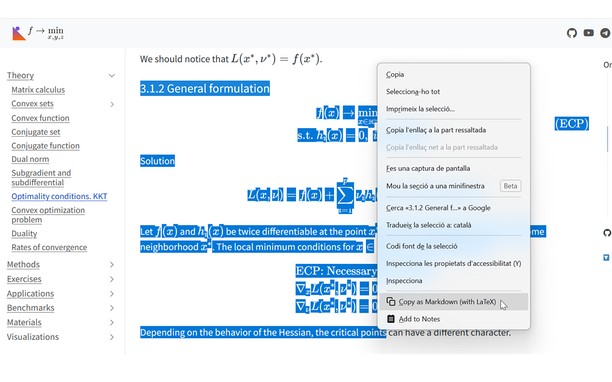
Copy LaTeX code from any KaTeX or MathJax-rendered math expression directly in your browser. It also works with Wikipedia images. Hover over an equation and then click to copy the LaTeX code to your clipboard. Works on ChatGPT, DeepSeek, Stack Exchange, GitHub, ProofWiki and any website using KaTeX or MathJax as well as Wikipedia and Wikiwand.
v1.4 Update: Now you can also select text that includes equations and right click to copy the selection as Markdown.
v1.5 Update: Now with Typst support! You can choose between LaTeX mode or Typst mode.
v1.6 Update: You can now set some config options like the theme or the context menu in the popup UI.
v1.7 Update: Now you can enable Ctrl+C to copy the selection and can disable the hover overlay (and use right click instead).
You can see a tutorial on how to disable or add certain sites and read more information about this add-on in the GitHub repo of the extension: https://github.com/Mapaor/copy-latex-chrome-extension.
- 이 확장 기능은 모든 웹 사이트의 데이터에 액세스할 수 있습니다.
- This extension can write data into the clipboard.
스크린샷
확장 기능 정보
- 다운로드 횟수
- 2
- 범주
- 생산성
- 버전
- 1.7.2
- 크기
- 158.5 KB
- 최종 업데이트 일
- 2026년 11월 20일
- 라이선스
- 지원 페이지
- https://mapaor.github.io/copy-latex-website
- 소스 코드 페이지
- https://github.com/Mapaor/copy-latex-chrome-extension
Related
-
Simple Video Speed Controller
모든 웹사이트에서 비디오 속도를 자동으로 조절하세요.
등급: 총 등급 수: 9
-
Speed Test
Speed Test Most Accurate Online Broadband Internet Speed Test
등급: 총 등급 수: 22
-
Hotellook.com - compare hotel prices
compare prices sourced from more than 30 booking websites
등급: 총 등급 수: 1
-
Evernote Web Clipper
Evernote 확장 프로그램을 사용해 웹에서 본 정보를 Evernote 계정에 저장하세요.
등급: 총 등급 수: 540
-
Boomerang for Gmail™
Allows you to schedule messages to be sent or returned at a later date.
등급: 총 등급 수: 48