Opera ブラウザ が必要です。
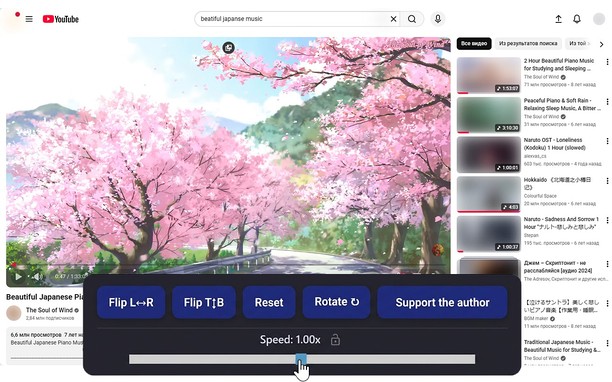
Reflects video vertically and horizontally, speeds up or slows down playback, rotates by 90°, and compresses video height and width — useful for fixing distorted videos.
How it works
Hotkeys:
Alt + * (NumPad): Show/hide control panel.
Alt + 1 / 3 (NumPad): Decrease or increase playback speed (step 0.01).
🔒 Lock near the speed — if you click it, it will remember any changed speed for the entire domain.
Alt + 4 / 6 (NumPad): Compress or stretch the frame horizontally.
Alt + 2 / 8 (NumPad): Compress or stretch the frame vertically.
Alt + 5 (NumPad): Reset all settings.
Alt + 7 (NumPad): Decrease frame size on both axes.
Alt + 9 (NumPad): Increase frame size on both axes.
Alt + 0 (NumPad): Rotate video 90°.
Compatibility:
Works on almost all sites.
Works in full-screen mode.
- この拡張機能は、すべてのサイトのデータにアクセス可能です。
スクリーンショット
拡張機能について
- ダウンロード数
- 10835
- カテゴリ
- 効率アップツール
- バージョン
- 1.5.0
- サイズ
- 66.0 KB
- Last update
- 2026年4月20日
- ライセンス
- プライバシーポリシー
Related
-
Window Resizer
Easily set the layout (size & position) of your browser window
評価: 評価の総数: 9
-
2FAS - Two factor authentication
2FAS extension is simple, private, and secured: one click, one tap, and your 2FA token is automatically entered!
評価: 評価の総数: 16
-
Evernote Web Clipper
Evernote の拡張機能を使用して、Web 上で見つけたページを Evernote アカウントに保存します。
評価: 評価の総数: 630
-
Atavi bookmarks
全デバイスとブラウザーのブックマークを同期
評価: 評価の総数: 173
-
HEIC to JPG Converter
ブラウザで直接HEIF/HEIC画像をJPGまたはPNGに変換
評価: 評価の総数: 1