Opera ブラウザ が必要です。
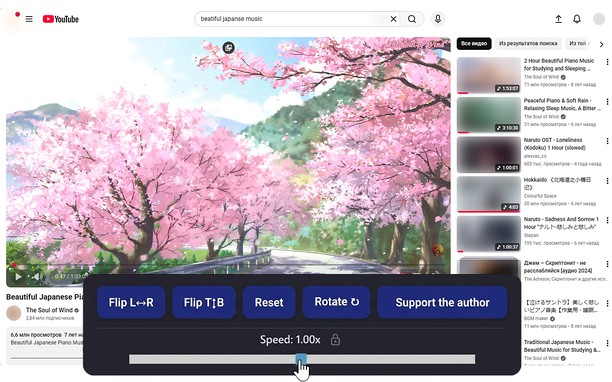
Mirrors video vertically and horizontally, speeds up or slows down, rotates by 90°, and compresses video height and width — useful for correcting distorted videos on websites.
How It Works
Keyboard Shortcuts:
Alt + * (Numpad): Show/hide the control panel.
Alt + 4/ 6(Numpad) Compress or stretch the frame horizontally.
Alt + 2/ 8(Numpad): Compress or stretch the frame vertically.
Alt + 5(Numpad) Reset all settings
Alt + 7(Numpad): Reduce frame size on both axes simultaneously.
Alt + 9(Numpad): Enlarge frame size on both axes simultaneously.
Alt + 1 / 3(Numpad): Decrease or increase playback speed (step 0.01).
Alt + 0(Numpad): Rotate video 90°.
Compatibility:
Works on practically all websites.
- この拡張機能は、すべてのサイトのデータにアクセス可能です。
スクリーンショット
拡張機能について
- ダウンロード数
- 7421
- カテゴリ
- 効率アップツール
- バージョン
- 1.2.0
- サイズ
- 51.4 KB
- Last update
- 2026年1月23日
- ライセンス
- プライバシーポリシー
Related
-
Atavi bookmarks
全デバイスとブラウザーのブックマークを同期
評価: 評価の総数: 173
-
AI Detector for ChatGPT & more - Winston AI
Winston AI is the most reliable AI detector for discerning AI-generated content from ChatGPT and all other known LLM’s such as Google Bard, Claude, LLama and much more.
評価: 評価の総数: 8
-
MyIPCam
Easy and quick way to view and control your IP-cameras
評価: 評価の総数: 30
-
Evernote Web Clipper
Evernote の拡張機能を使用して、Web 上で見つけたページを Evernote アカウントに保存します。
評価: 評価の総数: 636
-
Page Screenshot
Take a screenshot from the entire website with just one click!
評価: 評価の総数: 48