Opera ブラウザ が必要です。
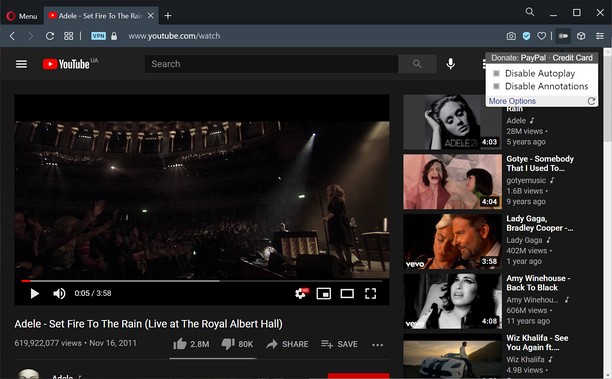
Turn off YouTube autoplay or turn off YouTube annotations. Also hides the toggle option when disabled.
Compatible with mobile and embedded YouTube videos as well.
For more features including removing recommendations, comments, and more, try the Unhook YouTube add-on: https://chrome.google.com/webstore/detail/unhook-remove-youtube-rec/khncfooichmfjbepaaaebmommgaepoid
Turn Off YouTube Autoplay Next & Annotations is available on:
- Opera: https://addons.opera.com/en/extensions/details/turn-off-youtube-autoplay-next-annotations/
- Chrome: https://chrome.google.com/webstore/detail/turn-off-youtube-autoplay/pcapooophggbaedfdmmmmbldmhlbbjob
- Firefox: https://addons.mozilla.org/firefox/addon/youtube-autoplay-annotations/
- Microsoft Edge: https://microsoftedge.microsoft.com/addons/detail/turn-off-youtube-autoplay/apdogalndjbldgojpfofdcdlmblgpjef
- この拡張機能は一部のサイトのデータにアクセス可能です。
スクリーンショット
拡張機能について
- ダウンロード数
- 2194
- カテゴリ
- 効率アップツール
- バージョン
- 1.0.8
- サイズ
- 11.3 KB
- Last update
- 2023年1月20日
- ライセンス
- プライバシーポリシー
- サービスサイト
- https://unhook.app/
Related
-
Mute Tab
Easily mute all tabs with just one click!
評価: 評価の総数: 12
-
Evernote Web Clipper
Evernote の拡張機能を使用して、Web 上で見つけたページを Evernote アカウントに保存します。
評価: 評価の総数: 553
-
VDO Software
VDO Software web design company,providing a full range of Website Design services
評価: 評価の総数: 1
-
Atavi bookmarks
全デバイスとブラウザーのブックマークを同期
評価: 評価の総数: 160
-
Rotate that Video Player
Improve your video experience by effortlessly rotating your video clips by 90, 180, or 270 degrees.
評価: 評価の総数: 6