Opera ブラウザ が必要です。
Do you often need to open multiple URLs at once? Whether you’re managing research, monitoring websites, or just multitasking, Multiple URL Opener makes it quick and easy to launch all your URLs in separate tabs with just a single click. This lightweight and user-friendly Opera extension is designed to simplify your workflow and save precious time.
Key Features:
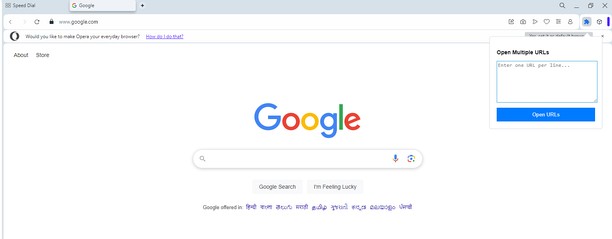
Batch URL Opening: Enter multiple URLs in the text box and open them all instantly in new tabs.
Smart URL Formatting: Automatically detects and corrects URLs without "http://" or "https://" prefixes.
Customizable Input: Simply paste URLs from any source; no need for manual adjustments.
Secure and Private: No data is sent outside your browser. All operations happen locally for maximum privacy.
Simple Interface: Clean, intuitive design for seamless user experience.
Who Is This For?:
Researchers and Students: Manage and open multiple references effortlessly.
Web Developers and Testers: Quickly check multiple environments or domains.
Digital Marketers: Track campaigns, analytics, and reports across platforms.
Everyday Users: Save time when opening your favorite websites all at once.
How It Works:
Click on the Multiple URL Opener icon in your Opera toolbar.
Paste or type multiple URLs into the input box, with each URL on a new line.
Click the Open URLs button, and voilà! All URLs will open in separate tabs instantly.
- この拡張機能は、すべてのサイトのデータにアクセス可能です。
- この拡張機能は、タブおよびブラウジングアクティビティにアクセス可能です。
スクリーンショット
拡張機能について
- ダウンロード数
- 1244
- カテゴリ
- 効率アップツール
- バージョン
- 1.0
- サイズ
- 14.0 KB
- Last update
- 2025年1月8日
- ライセンス
- プライバシーポリシー
- サービスサイト
- https://magecomp.com/multiple-url-opener
- サポートページ
- https://magecomp.com/contact
Related
-
Scroll navigator
Scroll any page to the top/bottom and back by left/right click on the left border of the page, horisontal scroll, scroll by entire page on mouse wheel and more.
評価: 評価の総数: 21
-
Workspace Tab Counter
A tab counter specifically for GX, which counts tabs per workspace too.
評価: 評価の総数: 7
-
Copy URL + Title
Lets you copy URL, Title, Title + URL of All Open Tabs or Current tabs in Text or HTML format using the right click menu.
評価: 評価の総数: 13
-
Evernote Web Clipper
Evernote の拡張機能を使用して、Web 上で見つけたページを Evernote アカウントに保存します。
評価: 評価の総数: 633
-
Atavi bookmarks
全デバイスとブラウザーのブックマークを同期
評価: 評価の総数: 172