Opera ブラウザ が必要です。
Copy LaTeX code from any KaTeX or MathJax-rendered math expression directly in your browser. It also works with Wikipedia images. Hover over an equation and then click to copy the LaTeX code to your clipboard. Works on ChatGPT, DeepSeek, Stack Exchange, GitHub, ProofWiki and any website using KaTeX or MathJax as well as Wikipedia and Wikiwand.
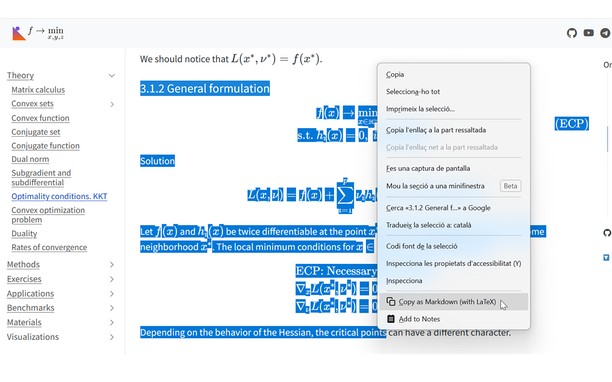
v1.4 Update: Now you can also select text that includes equations and right click to copy the selection as Markdown.
v1.5 Update: Now with Typst support! You can choose between LaTeX mode or Typst mode.
v1.6 Update: You can now set some config options like the theme or the context menu in the popup UI.
v1.7 Update: Now you can enable Ctrl+C to copy the selection and can disable the hover overlay (and use right click instead).
You can see a tutorial on how to disable or add certain sites and read more information about this add-on in the GitHub repo of the extension: https://github.com/Mapaor/copy-latex-chrome-extension.
- この拡張機能は、すべてのサイトのデータにアクセス可能です。
- This extension can write data into the clipboard.
スクリーンショット
拡張機能について
- ダウンロード数
- 2
- カテゴリ
- 効率アップツール
- バージョン
- 1.7.2
- サイズ
- 158.5 KB
- Last update
- 2026年11月20日
- ライセンス
- サポートページ
- https://mapaor.github.io/copy-latex-website
- ソースコードのページ
- https://github.com/Mapaor/copy-latex-chrome-extension
Related
-
Anime Merkliste
Saves your favorit anime to bookmarks easy
評価: 評価の総数: 5
-
IP Viewer
Shows the current IP address
評価: 評価の総数: 1
-
Evernote Web Clipper
Evernote の拡張機能を使用して、Web 上で見つけたページを Evernote アカウントに保存します。
評価: 評価の総数: 540
-
Boomerang for Gmail™
Allows you to schedule messages to be sent or returned at a later date.
評価: 評価の総数: 48
-
Undo/Duplicate Tabs
Undo a closed Tab(s) or create a duplicate of your current Tab
評価: 評価の総数: 4