Opera böngésző szükséges.
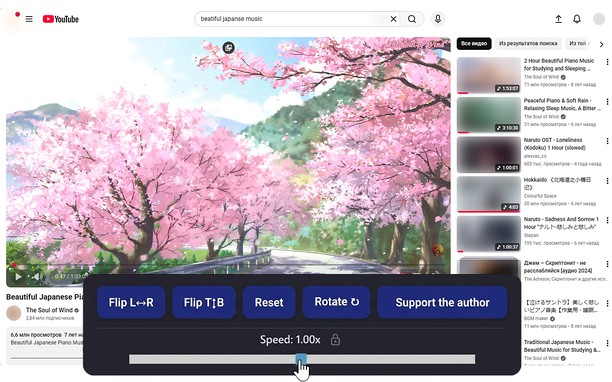
Reflects video vertically and horizontally, speeds up or slows down playback, rotates by 90°, and compresses video height and width — useful for fixing distorted videos.
How it works
Hotkeys:
Alt + * (NumPad): Show/hide control panel.
Alt + 1 / 3 (NumPad): Decrease or increase playback speed (step 0.01).
🔒 Lock near the speed — if you click it, it will remember any changed speed for the entire domain.
Alt + 4 / 6 (NumPad): Compress or stretch the frame horizontally.
Alt + 2 / 8 (NumPad): Compress or stretch the frame vertically.
Alt + 5 (NumPad): Reset all settings.
Alt + 7 (NumPad): Decrease frame size on both axes.
Alt + 9 (NumPad): Increase frame size on both axes.
Alt + 0 (NumPad): Rotate video 90°.
Compatibility:
Works on almost all sites.
Works in full-screen mode.
- Ez a kiegészítő hozzáfér az adatához az összes webhelyen.
Képernyőkép
A kiegészítőről
- Letöltések
- 8 594
- Kategória
- Produktivitás
- Verzió
- 1.4.0
- Méret
- 60,3 KB
- Last update
- 2026. február 17.
- Licenc
- Adatvédelmi leírás
Kapcsolódó
-
Evernote Web Clipper
Use the Evernote extension to save things you see on the web into your Evernote account.
Osztályzat: Összes értékelés száma: 633
-
Gravatar Research
Click the right button of mouse on the image Gravatar to instantly receive the email address of an owner Gravatar
Osztályzat: Összes értékelés száma: 3
-
Atavi bookmarks
Visual bookmarks, bookmarks sync across various browsers and absolute safety for your bookmarks
Osztályzat: Összes értékelés száma: 171
-
Hot Virtual Keyboard Extension
Brings up the virtual keyboard when entering text input fields. Hot Virtual Keyboard software has to be installed and running.
Osztályzat: Összes értékelés száma: 10
-
Reopen in Private
Reopen the current tab into a private window
Osztályzat: Összes értékelés száma: 0