Opera böngésző szükséges.
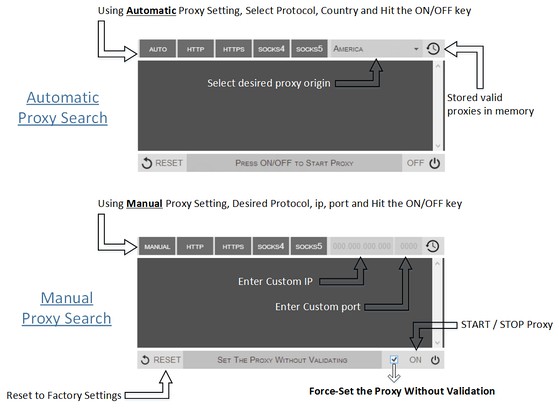
Proxy Finder (IP Switcher) is an Opera extension which automatically switches an Internet connection across one or more proxy servers. Put simply, Proxy Finder automates the manual process of editing Opera's Proxy Settings dialog. Proxy server switching occurs based on the Manual or Automatic mode you define.
In the manual mode (default) you need to choose a protocol (http, https, socks4, or socks5) and enter a desired IP and Port, then press ON/OFF button to start the proxy. For the automatic mode, the extension uses its online server to search for a working proxy based on the protocol(s) and origin you have chosen.
Moreover, animated icons show you when a proxy is in use. Advanced logging shows you which proxies were used. If you have any question or concern, feel free to contact me via the following address: philip[dot]tholus[at]gmail.com
- Ez a kiegészítő hozzáfér az adatához az összes webhelyen.
- Ez a kiegészítő kezeli a kiegészítőket.
- Ez a kiegészítő hozzáfér a proxy beállításaidhoz.
- Ez a kiegészítő hozzáfér a lapokhoz és a böngészési tevékenységhez.
Képernyőképek
A kiegészítőről
- Letöltések
- 87 933
- Kategória
- Produktivitás
- Verzió
- 0.1.3
- Méret
- 52,8 KB
- Last update
- 2014. szeptember 9.
- Licenc
- Copyright 2014 philiptholus
Kapcsolódó
-
put.io
Adds an option to right-click menu that downloads the link with put.io.
Osztályzat: Összes értékelés száma: 1
-
Evernote Web Clipper
Use the Evernote extension to save things you see on the web into your Evernote account.
Osztályzat: Összes értékelés száma: 609
-
Simple Checker for Gmail™
Get badge notification when you receive a new email in your inbox
Osztályzat: Összes értékelés száma: 3
-
Atavi bookmarks
Visual bookmarks, bookmarks sync across various browsers and absolute safety for your bookmarks
Osztályzat: Összes értékelés száma: 169
-
TrashMail.com: Create disposable address
Create disposable email addresses.
Osztályzat: Összes értékelés száma: 3