Opera böngésző szükséges.
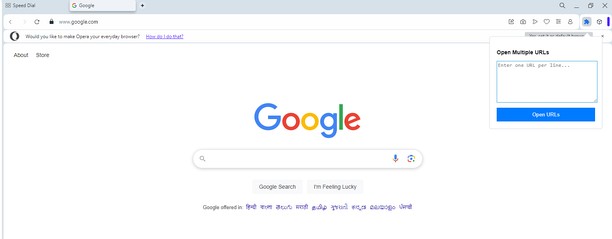
Do you often need to open multiple URLs at once? Whether you’re managing research, monitoring websites, or just multitasking, Multiple URL Opener makes it quick and easy to launch all your URLs in separate tabs with just a single click. This lightweight and user-friendly Opera extension is designed to simplify your workflow and save precious time.
Key Features:
Batch URL Opening: Enter multiple URLs in the text box and open them all instantly in new tabs.
Smart URL Formatting: Automatically detects and corrects URLs without "http://" or "https://" prefixes.
Customizable Input: Simply paste URLs from any source; no need for manual adjustments.
Secure and Private: No data is sent outside your browser. All operations happen locally for maximum privacy.
Simple Interface: Clean, intuitive design for seamless user experience.
Who Is This For?:
Researchers and Students: Manage and open multiple references effortlessly.
Web Developers and Testers: Quickly check multiple environments or domains.
Digital Marketers: Track campaigns, analytics, and reports across platforms.
Everyday Users: Save time when opening your favorite websites all at once.
How It Works:
Click on the Multiple URL Opener icon in your Opera toolbar.
Paste or type multiple URLs into the input box, with each URL on a new line.
Click the Open URLs button, and voilà! All URLs will open in separate tabs instantly.
- Ez a kiegészítő hozzáfér az adatához az összes webhelyen.
- Ez a kiegészítő hozzáfér a lapokhoz és a böngészési tevékenységhez.
Képernyőképek
A kiegészítőről
- Letöltések
- 2 040
- Kategória
- Produktivitás
- Verzió
- 1.0
- Méret
- 14,0 KB
- Last update
- 2025. január 8.
- Licenc
- Adatvédelmi leírás
- Szolgáltatói webhely
- https://magecomp.com/multiple-url-opener
- Támogatási lap
- https://magecomp.com/contact
Kapcsolódó
-
Bibi Healthy Bread
Its all about bread , its types , its benifits and its making procedure etc
Osztályzat: Összes értékelés száma: 1
-
Boomerang for Gmail™
Allows you to schedule messages to be sent or returned at a later date.
Osztályzat: Összes értékelés száma: 46
-
Autofill Forms
Autofill Forms using keyboard shortcut or toolbar button.
Osztályzat: Összes értékelés száma: 6
-
Evernote Web Clipper
Use the Evernote extension to save things you see on the web into your Evernote account.
Osztályzat: Összes értékelés száma: 552
-
Video Converter
Convert any video file to selected formats (i.e. mp4) inside your browser!
Osztályzat: Összes értékelés száma: 7