Opera böngésző szükséges.
Key Features
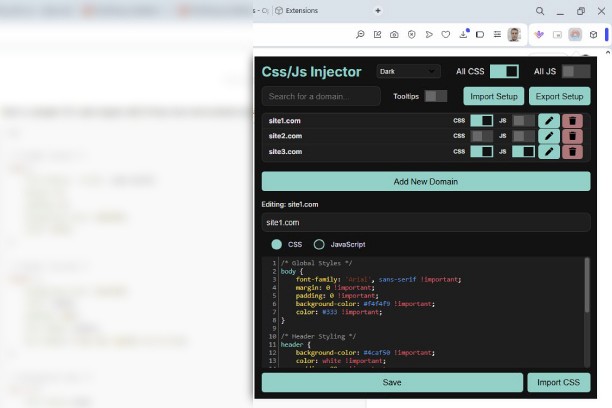
- Custom CSS & JavaScript Injection: Add and manage CSS/JS scripts for individual domains.
- Global Toggles: Quickly enable or disable all custom styles or scripts with one click.
- Export/Import Setup: Backup and share your configurations effortlessly in JSON format.
- Code Editing Tools: Enjoy features like syntax highlighting, autocompletion, and auto-indentation using the CodeMirror editor.
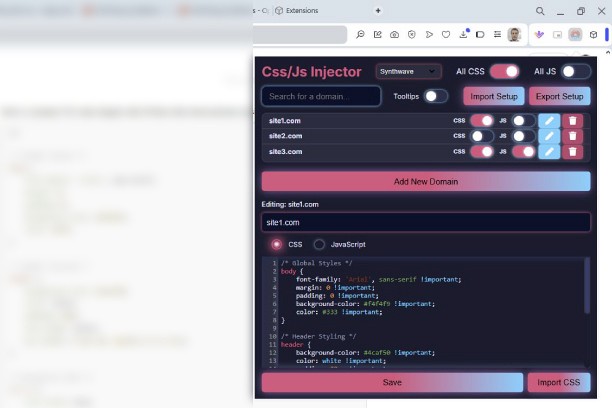
- Dynamic Themes: Choose from a variety of themes, including Dark Mode, Synthwave, Vaporwave, and more.
- Domain-Specific Control: Easily switch styles or scripts on and off for specific domains.
- Tooltip Assistance: Detailed tooltips for all major functionalities to guide you through usage.
- Secure Script Execution: Execute your custom scripts safely without interference.
How to Use
1. Install the Extension: Add the CSS & JS Injector to your browser from the Chrome or Opera Web Store.
2. Open the Extension: Click the extension icon to access the popup interface.
3. Select a Domain:
- Use the domain list to manage existing domains or add a new one.
4. Edit Styles or Scripts:
- Choose between CSS and JavaScript modes using the toggle.
- Write your code in the editor with real-time syntax highlighting.
5. Save and Apply:
- Save your changes, and they will be automatically applied to the domain.
Disclaimer
This extension is provided as-is, without warranty of any kind. Users are solely responsible for the code they inject into websites.
Licenses
This extension uses the following third-party libraries:
CodeMirror:
Homepage: https://codemirror.net/
License: MIT
License Text: Available in libs/codemirror/LICENSE.
Font Awesome:
Homepage: https://fontawesome.com/
License: Free version is licensed under the CC BY 4.0 license.
- Ez a kiegészítő hozzáfér az adatához az összes webhelyen.
Képernyőképek
A kiegészítőről
- Letöltések
- 1 876
- Kategória
- Developer Tools
- Verzió
- 1.1
- Méret
- 196,5 KB
- Last update
- 2024. december 11.
- Licenc
Kapcsolódó
-
Browserling - Cross-browser testing
Cross-browser test websites in the most popular browsers such as Internet Explorer, Edge, Chrome, Firefox, Safari and Opera. Try for free!
Osztályzat: Összes értékelés száma: 25
-
Web Developer
Adds a toolbar button with various web developer tools. The official port of the Web Developer extension for Firefox.
Osztályzat: Összes értékelés száma: 122
-
(X)HTML5 Checker
A small extension to validate the markup of current tab
Osztályzat: Összes értékelés száma: 3
-
Right Click Validator
Right click on any webpage to validate it using the W3 NUValidator service.
Osztályzat: Összes értékelés száma: 6
-
Pixel converter
Pixel converter is a crucial web development and design tool for converting pixel values into different measurement units like inches, centimeters, or percentages, ensuring consistency across diverse devices and screens in responsive web design.
Osztályzat: Összes értékelés száma: 1