Opera böngésző szükséges.
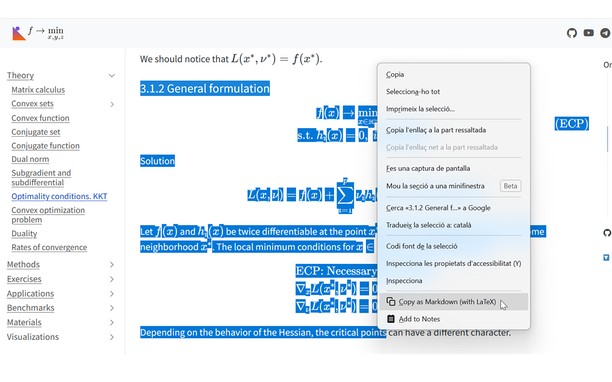
Copy LaTeX code from any KaTeX or MathJax-rendered math expression directly in your browser. It also works with Wikipedia images. Hover over an equation and then click to copy the LaTeX code to your clipboard. Works on ChatGPT, DeepSeek, Stack Exchange, GitHub, ProofWiki and any website using KaTeX or MathJax as well as Wikipedia and Wikiwand.
v1.4 Update: Now you can also select text that includes equations and right click to copy the selection as Markdown.
v1.5 Update: Now with Typst support! You can choose between LaTeX mode or Typst mode.
v1.6 Update: You can now set some config options like the theme or the context menu in the popup UI.
v1.7 Update: Now you can enable Ctrl+C to copy the selection and can disable the hover overlay (and use right click instead).
You can see a tutorial on how to disable or add certain sites and read more information about this add-on in the GitHub repo of the extension: https://github.com/Mapaor/copy-latex-chrome-extension.
- Ez a kiegészítő hozzáfér az adatához az összes webhelyen.
- This extension can write data into the clipboard.
Képernyőképek
A kiegészítőről
- Letöltések
- 2
- Kategória
- Produktivitás
- Verzió
- 1.7.2
- Méret
- 158,5 KB
- Last update
- 2026. november 20.
- Licenc
- Támogatási lap
- https://mapaor.github.io/copy-latex-website
- Forráskód lapja
- https://github.com/Mapaor/copy-latex-chrome-extension
Kapcsolódó
-
webcompat.com reporter
Click to report an incompatible site at webcompat.com, and optionally upload a screenshot.
Osztályzat: Összes értékelés száma: 3
-
Boomerang for Gmail™
Allows you to schedule messages to be sent or returned at a later date.
Osztályzat: Összes értékelés száma: 48
-
Evernote Web Clipper
Use the Evernote extension to save things you see on the web into your Evernote account.
Osztályzat: Összes értékelés száma: 540
-
Sidebar Sticky Note
Free HTML5 Sidebar Sticky Notes
Osztályzat: Összes értékelés száma: 125
-
GMX MailCheck
The safe way to access your personal mail.
Osztályzat: Összes értékelés száma: 170