Opera ब्राउज़र की आवश्यकता है।
Screen Recorder addon helps you record video from the computer's screen.
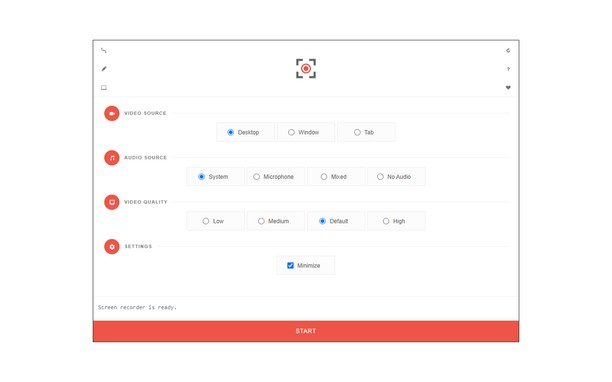
To work with this addon, please click on the toolbar button. Once the recorder interface appears, please adjust desired options, and then click the - Start - button. The video source could be your screen, window, or tab. The audio source can be the system's audio, microphone, mixed, or no audio at all. When you click the start button, a popup will appear within the interface. This popup window allows you to select the desired screen, tab, or window. To start recording please click on the - Share - button. When you are done recording the screen, please press the toolbar button (or the stop button on the app interface) to stop the recording process. The recorded video will be download to your computer automatically (on the default download location).
By default, recorded media is in - webm - format. To get more information about webm video format, please visit this Wikipedia page (https://en.wikipedia.org/wiki/WebM). If you want to change this format to a different one, please use a different software.
To report bugs, please fill the bug report form on the addon's homepage (https://mybrowseraddon.com/screen-recorder.html).
- यह एक्सटेंशन संपूर्ण स्क्रीन या अलग-अलग टैब और windows की सामग्री कैप्चर कर सकता है।
- This extension can store an unlimited amount of client-side data.
स्क्रीनशॉट
एक्सटेंशन के बारे में
- डाउनलोड
- 38470
- श्रेणी
- उत्पादकता
- संस्करण
- 0.1.5
- आकार
- 41.6 केबी
- Last update
- 1 फ़रवरी 2023
- लाइसेंस
- Copyright 2021 moristong
- सहायता पृष्ठ
- https://mybrowseraddon.com/screen-recorder.html
Related
-
Evernote Web Clipper
Use the Evernote extension to save things you see on the web into your Evernote account.
रेटिंग: रेटिंग की कुल संख्या: 649
-
GIF Blocker
Block GIF and WebP animation images on HTML pages to reduce bandwidth and resource usage
रेटिंग: रेटिंग की कुल संख्या: 7
-
Youtube Subscriptions Transfer
Transferring subscriptions from one YouTube account to another YouTube Subscriptions Transfer is a browser extension that allows you to transfer or move subscriptions from one account to another using XPath or API. The extension collects a list of channels and enables you to subscribe or unsubscribe to each channel. It interacts with the DOM using xpath and YouTube Data API v3.
रेटिंग: रेटिंग की कुल संख्या: 1
-
Atavi bookmarks
Visual bookmarks, bookmarks sync across various browsers and absolute safety for your bookmarks
रेटिंग: रेटिंग की कुल संख्या: 177
-
Video Converter
Convert any video file to selected formats (i.e. mp4) inside your browser!
रेटिंग: रेटिंग की कुल संख्या: 10