


 Opera ब्राउज़र की आवश्यकता है।
- This extension can exchange messages with programs other than Opera.
- This extension can create rich notifications and display them to you in the system tray.
स्क्रीनशॉट

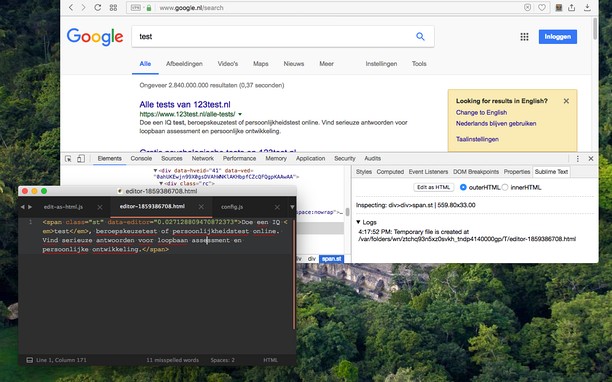
एक्सटेंशन के बारे में
- डाउनलोड
- 5524
- श्रेणी
- Developer Tools
- संस्करण
- 0.2.3
- आकार
- 185.5 केबी
- Last update
- 24 अगस्त 2022
- लाइसेंस
- Copyright 2022 joe-ertaba
- सेवा वेबसाइट
- https://add0n.com/edit-as-html.html?from=sublime
- सहायता पृष्ठ
- https://add0n.com/edit-as-html.html?from=sublime
- स्रोत कोड पृष्ठ
- https://github.com/belaviyo/edit-as-html/
Related
-

Super Auto Refresh
Auto-refresh (reload) pages, on a selected interval. NO ADs. SUPER EASY.
-

Web Widgetizer
Web Widgetizer is a extension offering a range of features to enhance browsing. It allows users to create separate Opera windows for specific websites, manage favorite links, customize window dimensions, toggle auto-start, and open links in popup tabs via button click or shortcut (Ctrl + Shift + A). This versatile tool optimizes browsing convenience and efficiency.
-

Web Developer
Adds a toolbar button with various web developer tools. The official port of the Web Developer extension for Firefox.
-

Caffeine
Keep awake which prevents the OS from automatically going to sleep, dimming the screen or starting screen savers
-

Sheets2JSON - Convert Google Sheets
Convert public Google Sheets into clean JSON or CSV. Sheet2JSON is a lightweight extractor that reads Google Sheets and outputs structured data formats that are ready to use in websites, apps, and scripts.