Opera ब्राउज़र की आवश्यकता है।
Copy LaTeX code from any KaTeX or MathJax-rendered math expression directly in your browser. It also works with Wikipedia images. Hover over an equation and then click to copy the LaTeX code to your clipboard. Works on ChatGPT, DeepSeek, Stack Exchange, GitHub, ProofWiki and any website using KaTeX or MathJax as well as Wikipedia and Wikiwand.
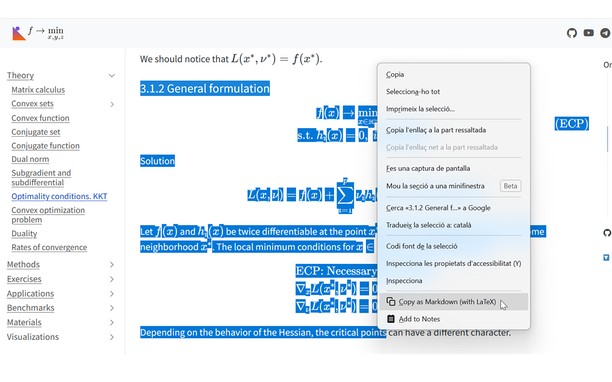
v1.4 Update: Now you can also select text that includes equations and right click to copy the selection as Markdown.
v1.5 Update: Now with Typst support! You can choose between LaTeX mode or Typst mode.
v1.6 Update: You can now set some config options like the theme or the context menu in the popup UI.
v1.7 Update: Now you can enable Ctrl+C to copy the selection and can disable the hover overlay (and use right click instead).
You can see a tutorial on how to disable or add certain sites and read more information about this add-on in the GitHub repo of the extension: https://github.com/Mapaor/copy-latex-chrome-extension.
- यह एक्सटेंशन सभी वेबसाइट पर आपके डेटा तक पहुँच प्राप्त कर सकता है।
- This extension can write data into the clipboard.
स्क्रीनशॉट
एक्सटेंशन के बारे में
- डाउनलोड
- 2
- श्रेणी
- उत्पादकता
- संस्करण
- 1.7.2
- आकार
- 158.5 केबी
- Last update
- 20 नवमबर 2026
- लाइसेंस
- सहायता पृष्ठ
- https://mapaor.github.io/copy-latex-website
- स्रोत कोड पृष्ठ
- https://github.com/Mapaor/copy-latex-chrome-extension
Related
-
Evernote Web Clipper
Use the Evernote extension to save things you see on the web into your Evernote account.
रेटिंग: रेटिंग की कुल संख्या: 540
-
Generator Wattage Calculator
Generator sizing calculator, calculate required running & starting watts. Visit Generator Fixer for generator recommendations.
रेटिंग: रेटिंग की कुल संख्या: 1
-
Magyar Nevnapok
रेटिंग: रेटिंग की कुल संख्या: 9
-
PDF to Image Converter
Convert one or more files PDF to images
रेटिंग: रेटिंग की कुल संख्या: 7
-
Boomerang for Gmail™
Allows you to schedule messages to be sent or returned at a later date.
रेटिंग: रेटिंग की कुल संख्या: 48