נדרש דפדפן Opera.
Copy LaTeX code from any KaTeX or MathJax-rendered math expression directly in your browser. It also works with Wikipedia images. Hover over an equation and then click to copy the LaTeX code to your clipboard. Works on ChatGPT, DeepSeek, Stack Exchange, GitHub, ProofWiki and any website using KaTeX or MathJax as well as Wikipedia and Wikiwand.
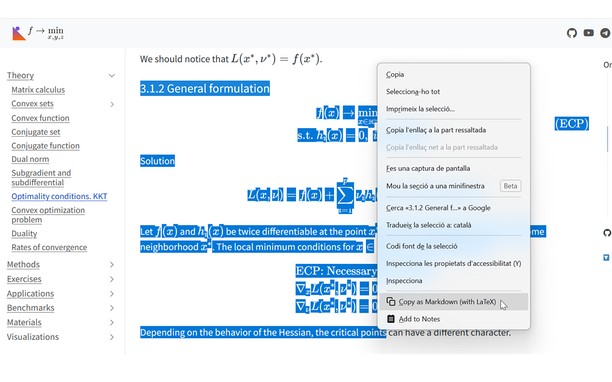
v1.4 Update: Now you can also select text that includes equations and right click to copy the selection as Markdown.
v1.5 Update: Now with Typst support! You can choose between LaTeX mode or Typst mode.
v1.6 Update: You can now set some config options like the theme or the context menu in the popup UI.
v1.7 Update: Now you can enable Ctrl+C to copy the selection and can disable the hover overlay (and use right click instead).
You can see a tutorial on how to disable or add certain sites and read more information about this add-on in the GitHub repo of the extension: https://github.com/Mapaor/copy-latex-chrome-extension.
- הרחבה זו יכולה לגשת למידע שלך בכל אתרי האינטרנט.
- This extension can write data into the clipboard.
צילומי מסך
אודות ההרחבה
- הורדות
- 2
- קטגוריה
- פרודוקטיביות
- גרסה
- 1.7.2
- גודל
- 158.5 ק"ב
- Last update
- 20 בנובמבר 2026
- רשיון
- דף תמיכה
- https://mapaor.github.io/copy-latex-website
- דף קוד מקור
- https://github.com/Mapaor/copy-latex-chrome-extension
Related
-
Boomerang for Gmail™
Allows you to schedule messages to be sent or returned at a later date.
דירוג: מספר דירוגים: 48
-
Evernote Web Clipper
Use the Evernote extension to save things you see on the web into your Evernote account.
דירוג: מספר דירוגים: 540
-
Page Screenshot
Take a screenshot from the entire website with just one click!
דירוג: מספר דירוגים: 48
-
본인인증 자동완성 (Auth Autofill)
한국 휴대전화 본인인증 자동완성 브라우저 확장 프로그램
דירוג: מספר דירוגים: 1
-
Quick JIRA
Quickly opens the JIRA with the corresponding ticket
דירוג: מספר דירוגים: 4