נדרש דפדפן Opera.
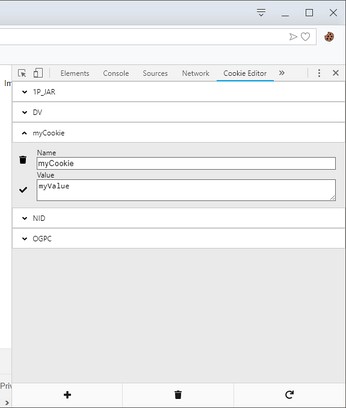
Cookie-Editor is designed to have a simple to use interface that let you do most standard cookie operations. It is ideal for developing and testing web pages or even manual management of cookies for your privacy.
Be careful! Do not share your cookies with anyone you do not trust! Cookies can contain very sensitive information like your login information. If you share your cookies with someone, they could gain full access to your account and compromise it.
Feature list:
- List all cookies for the current tab.
- Search your cookies.
- Create, edit and delete your cookies.
- Import and export your cookies in many formats (JSON, Netscape, Header string)
- Quickly delete all cookies for the current tab.
- Customizable: chose what extra data to see, what theme to use (light or dark), the amount of detail to see (advanced mode).
Cookie-Editor can help you:
- Develop web pages.
- Improve your SEO work.
- Manage your cookies for privacy.
- Improve your browsing experience.
Cookie-Editor believes in privacy. Your Cookies are safe and all of your data remains offline.
For all feature requests or bug report, please visit the GitHub repository and fill an issue https://github.com/Moustachauve/cookie-editor
- הרחבה זו יכולה לגשת למידע שלך בכל אתרי האינטרנט.
- הרחבה זו יכולה לגשת ללשוניות ולפעילות הגלישה שלך.
צילומי מסך
אודות ההרחבה
- הורדות
- 244698
- קטגוריה
- Developer Tools
- גרסה
- 1.13.0
- גודל
- 274.4 ק"ב
- Last update
- 30 באוקטובר 2024
- רשיון
- מדיניות פרטיות
- אתר שירות
- https://cookie-editor.com
- דף תמיכה
- https://github.com/Moustachauve/cookie-editor/issues
- דף קוד מקור
- https://github.com/Moustachauve/cookie-editor/
Related
-
Browserling - Cross-browser testing
Cross-browser test websites in the most popular browsers such as Internet Explorer, Edge, Chrome, Firefox, Safari and Opera. Try for free!
דירוג: מספר דירוגים: 15
-
FullScreen for Opera
Fullscreen, #1 Zoom and Dark Mode more options will get in one
דירוג: מספר דירוגים: 4
-
Web Widgetizer
Web Widgetizer is a extension offering a range of features to enhance browsing. It allows users to create separate Opera windows for specific websites, manage favorite links, customize window dimensions, toggle auto-start, and open links in popup tabs via button click or shortcut (Ctrl + Shift + A). This versatile tool optimizes browsing convenience and efficiency.
דירוג: מספר דירוגים: 2
-
Simple WCAG Contrast Checker
Checks color contrast on the current page against WCAG contrast requirements.
דירוג: מספר דירוגים: 0
-
Web Developer
Adds a toolbar button with various web developer tools. The official port of the Web Developer extension for Firefox.
דירוג: מספר דירוגים: 111