Feumar brabhsair Opera.
Volume Booster Tab raises the volume of any browser tab beyond what the page itself allows, and gives you real control over how that sound is shaped.
FEATURES
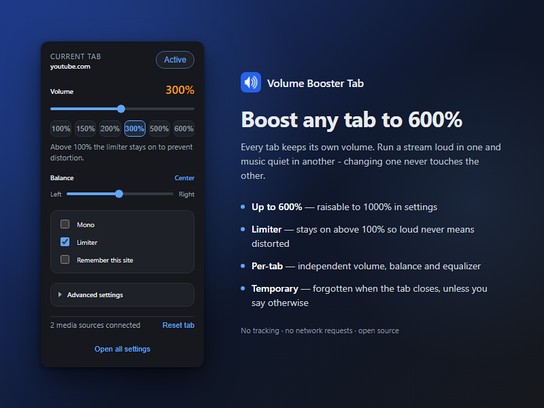
• Boost from 0% to 600%, raisable to 1000% in settings
• Limiter that prevents clipping and painful peaks when boosting
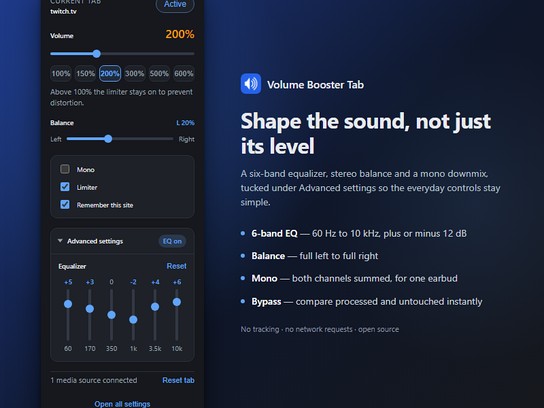
• 6-band equalizer, 60 Hz to 10 kHz, under Advanced settings
• Stereo balance, from full left to full right
• Mono downmix for listening with a single earbud
• Bypass switch to compare the processed and untouched sound instantly
• Available in 55 languages, fully translated
EVERY TAB IS INDEPENDENT
This is the part most volume boosters get wrong. Every tab keeps its own volume, its own equalizer curve, its own balance. Run a stream at 300% in one tab and music at 120% in another; changing one never touches the other.
The toolbar badge shows the level of the tab you are looking at, so you can tell at a glance which tabs are amplified.
TEMPORARY BY DEFAULT
A boost is forgotten when you close the tab. A setting you chose for one video can never surprise you weeks later on a different page.
If you do want a site to always open at the same volume, tick "Remember this site" in the popup. The settings page lists every site you have saved, lets you edit or remove any of them, and can make new tabs remember automatically.
KEEPS UP WITH STREAMING SITES
Sites like YouTube, Twitch and Kick replace their video player when you move to the next episode or stream, without reloading the page. Many boosters lose the audio at that moment and keep showing a level they are no longer applying.
This one watches for the swap and reapplies your settings to the new player, so the volume you set stays the volume you get.
PRIVACY
No tracking. No analytics. No account. No network requests of any kind, not even for fonts. Your settings never leave your own machine.
WHAT IT CANNOT DO
DRM-protected services such as Netflix, Disney+, Prime Video and Spotify hide their audio from extensions by design, so they cannot be boosted. When a page cannot be processed the popup says so plainly instead of silently doing nothing.
Browser pages such as opera:// and the add-ons catalog are off limits to every extension, including this one.
PLEASE BOOST RESPONSIBLY
High volume can damage both your hearing and your speakers, especially with headphones. The limiter is on by default above 100% and you should leave it on. Raising the ceiling past 600% in settings is at your own risk.
OPEN SOURCE
Source code, issue tracker and contribution guide: https://github.com/ramazansancar/volume-booster-tab-extension
Licensed under the GNU Affero General Public License v3.0.
- Gheibh an leudachadh seo cothrom air do chuid dàta air gach làrach-lìn.
- Gheibh an leudachadh seo cothrom air na tabaichean agad is na bhrabhsaicheas tu.
Glacaidhean-sgrìn
Mun leudachan
- Na chaidh a luchdadh a-nuas
- 3751
- Roinn-seòrsa
- Coileanadh
- Tionndadh
- 0.5.2
- Meud
- 214.7 KB
- Last update
- 5 An Dàmhair 2026
- Ceadachas
- Poileasaidh Prìobhaideachd
- Làrach-lìn seirbheise
- https://github.com/ramazansancar/volume-booster-tab-extension
- Duilleag na taice
- https://github.com/ramazansancar/volume-booster-tab-extension/issues
- Duilleag a' chòd tùsail
- https://github.com/ramazansancar/volume-booster-tab-extension
Related
-
Reopen in Private
Reopen the current tab into a private window
Rangachadh: Rangachaidhean uile gu lèir: 0
-
Boomerang for Gmail™
Allows you to schedule messages to be sent or returned at a later date.
Rangachadh: Rangachaidhean uile gu lèir: 46
-
Evernote Web Clipper
Use the Evernote extension to save things you see on the web into your Evernote account.
Rangachadh: Rangachaidhean uile gu lèir: 549
-
shorten-url : Professional URL shortener
URL shortener with lot of features, detailed stats, traffic filters, redirect rules, QR codes, password protected links and more.
Rangachadh: Rangachaidhean uile gu lèir: 1
-
QR Code Tab
Adds a button in toolbar and show URL from current tab as QR code
Rangachadh: Rangachaidhean uile gu lèir: 9