Opera blêder is fereaske.
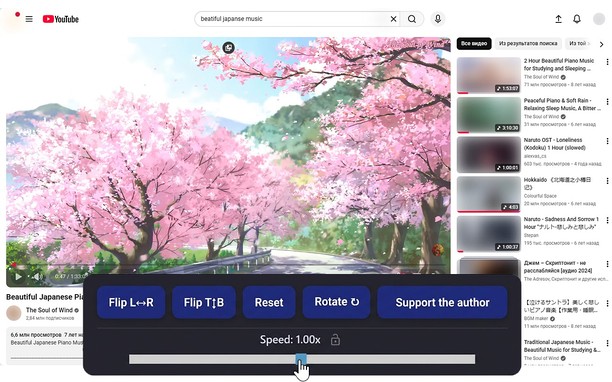
Reflects video vertically and horizontally, speeds up or slows down playback, rotates by 90°, and compresses video height and width — useful for fixing distorted videos.
How it works
Hotkeys:
Alt + * (NumPad): Show/hide control panel.
Alt + 1 / 3 (NumPad): Decrease or increase playback speed (step 0.01).
🔒 Lock near the speed — if you click it, it will remember any changed speed for the entire domain.
Alt + 4 / 6 (NumPad): Compress or stretch the frame horizontally.
Alt + 2 / 8 (NumPad): Compress or stretch the frame vertically.
Alt + 5 (NumPad): Reset all settings.
Alt + 7 (NumPad): Decrease frame size on both axes.
Alt + 9 (NumPad): Increase frame size on both axes.
Alt + 0 (NumPad): Rotate video 90°.
Compatibility:
Works on almost all sites.
Works in full-screen mode.
- Dizze tafoeging kin tagong ha ta jo gegevens op alle websteeën.
Skermprint
Oer de tafoeging
- Ynladen
- 11630
- Kategory
- Produktiviteit
- Ferzje
- 1.5.0
- Grutte
- 66.0 KB
- Last update
- April 20, 2026
- Lisinsje
- Privacy Belied
Related
-
Save as MHTML
Save active tab as MHTML web page archive file format with a single click
Wurdearring: Totale tal wurdearrings: 18
-
Easy Tab Manager
Advance tab and Window management tool.
Wurdearring: Totale tal wurdearrings: 24
-
Spell Bee Solver
An unofficial solver tool for word puzzle games. Not affiliated with The New York Times.
Wurdearring: Totale tal wurdearrings: 1
-
Evernote Web Clipper
Use the Evernote extension to save things you see on the web into your Evernote account.
Wurdearring: Totale tal wurdearrings: 630
-
Atavi bookmarks
Visual bookmarks, bookmarks sync across various browsers and absolute safety for your bookmarks
Wurdearring: Totale tal wurdearrings: 176