Opera blêder is fereaske.
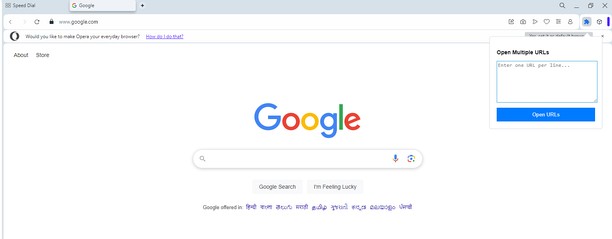
Do you often need to open multiple URLs at once? Whether you’re managing research, monitoring websites, or just multitasking, Multiple URL Opener makes it quick and easy to launch all your URLs in separate tabs with just a single click. This lightweight and user-friendly Opera extension is designed to simplify your workflow and save precious time.
Key Features:
Batch URL Opening: Enter multiple URLs in the text box and open them all instantly in new tabs.
Smart URL Formatting: Automatically detects and corrects URLs without "http://" or "https://" prefixes.
Customizable Input: Simply paste URLs from any source; no need for manual adjustments.
Secure and Private: No data is sent outside your browser. All operations happen locally for maximum privacy.
Simple Interface: Clean, intuitive design for seamless user experience.
Who Is This For?:
Researchers and Students: Manage and open multiple references effortlessly.
Web Developers and Testers: Quickly check multiple environments or domains.
Digital Marketers: Track campaigns, analytics, and reports across platforms.
Everyday Users: Save time when opening your favorite websites all at once.
How It Works:
Click on the Multiple URL Opener icon in your Opera toolbar.
Paste or type multiple URLs into the input box, with each URL on a new line.
Click the Open URLs button, and voilà! All URLs will open in separate tabs instantly.
- Dizze tafoeging kin tagong ha ta jo gegevens op alle websteeën.
- Dizze tafoeging kin tagong ha ta jo ljeppers en aktiviteit fan blêdzjen.
Skermprint
Oer de tafoeging
- Ynladen
- 1017
- Kategory
- Produktiviteit
- Ferzje
- 1.0
- Grutte
- 14.0 KB
- Last update
- Jan. 8, 2025
- Lisinsje
- Privacy Belied
- Tsjinst webstee
- https://magecomp.com/multiple-url-opener
- Stipe side
- https://magecomp.com/contact
Related
-
Merge Windows
Merge all browser windows in one
Wurdearring: Totale tal wurdearrings: 16
-
dota2mmrboost
Professional Dota 2 Boosting Service with a Top Notch Results
Wurdearring: Totale tal wurdearrings: 2
-
Discord Text Formatting
Elevate your Discord messages with easy-to-use text formatting tools. Bold, italicize, create spoilers, add code blocks, and more with just a few clicks.
Wurdearring: Totale tal wurdearrings: 1
-
Evernote Web Clipper
Use the Evernote extension to save things you see on the web into your Evernote account.
Wurdearring: Totale tal wurdearrings: 636
-
Atavi bookmarks
Visual bookmarks, bookmarks sync across various browsers and absolute safety for your bookmarks
Wurdearring: Totale tal wurdearrings: 173