Opera blêder is fereaske.
Preview any link in a pop-up frame without leaving current page (instead of opening a new tab), eliminating the need to go back and forth to navigate to other links. Very useful for exploring Google search results, Craigslist, Instagram, news feeds, etc. Also, search any text without leaving current page to look up for references, definitions, etc.
How to use the iFrame - Link Viewer extension:
1. Hover any link to show a tiny box on the right of the link
2. Click the tiny box to open an iFrame to preview the link
3. Drag the top bar to move the iFrame, drag the right bottom corner to resize it
4. Click outside the iFrame to close it
5. Text Search mode: Select any text to search, and click the tiny box to open search pop-up frame
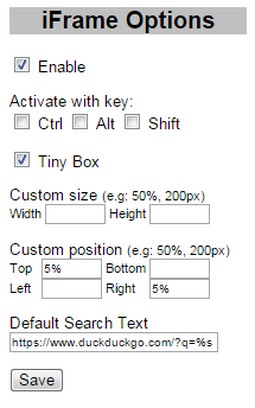
6. Option page on browser toolbar button:
- Enable/Disable
- Activate with Ctrl/Alt/Shift Key or their combination
- Show Tiny Box on link or directly show the iFrame link preview
- Custom size and position
- Default search text (leave blank to disable)
Search query examples: (don't forget %s)
https://www.google.com/search?q=%s
Note:
- Some websites do not allow to be opened in iframe, e.g: Stackoverflow
- When browsing through Google search results (or other secure sites using https), you might get "Blocked insecure content" warning, you need to Unblock the warning to allow iFrame to load previewed sites
- Dizze tafoeging kin tagong ha ta jo ljeppers en aktiviteit fan blêdzjen.
Skermprint
Oer de tafoeging
- Ynladen
- 18159
- Kategory
- Produktiviteit
- Ferzje
- 0.8
- Grutte
- 9.5 KB
- Last update
- Aug. 25, 2016
- Lisinsje
- Copyright 2016 mataherry
- Stipe side
- http://mataherry.blogspot.com/2011/10/iframe-opera-extension-updated-for.html
- Boarne koade side
- https://github.com/mataherry/iFrame/
Related
-
Boomerang for Gmail™
Allows you to schedule messages to be sent or returned at a later date.
Wurdearring: Totale tal wurdearrings: 46
-
ScrollAnywhere
Drag scrollbar with your middle mouse button anywhere on the page. Supports also "grab and drag" style and Momentum.
Wurdearring: Totale tal wurdearrings: 20
-
Recently Added Photos for Google Photos
Add a button to Google Photos to easily see the last uploaded photos in your gallery
Wurdearring: Totale tal wurdearrings: 9
-
Evernote Web Clipper
Use the Evernote extension to save things you see on the web into your Evernote account.
Wurdearring: Totale tal wurdearrings: 549
-
WebFilter
WebFilter allows users to block specific websites using categorical blacklist of URLs.
Wurdearring: Totale tal wurdearrings: 10