Se necesita el navegador Opera.
Screen Recorder addon helps you record video from the computer's screen.
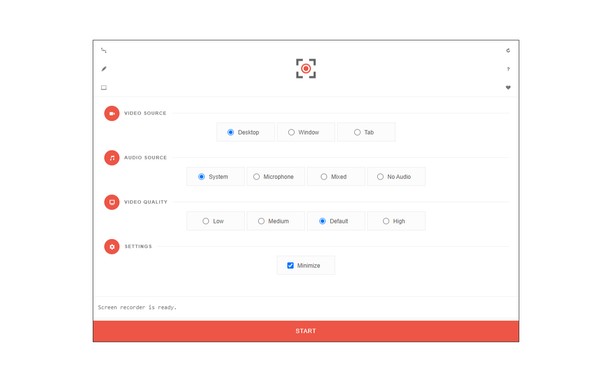
To work with this addon, please click on the toolbar button. Once the recorder interface appears, please adjust desired options, and then click the - Start - button. The video source could be your screen, window, or tab. The audio source can be the system's audio, microphone, mixed, or no audio at all. When you click the start button, a popup will appear within the interface. This popup window allows you to select the desired screen, tab, or window. To start recording please click on the - Share - button. When you are done recording the screen, please press the toolbar button (or the stop button on the app interface) to stop the recording process. The recorded video will be download to your computer automatically (on the default download location).
By default, recorded media is in - webm - format. To get more information about webm video format, please visit this Wikipedia page (https://en.wikipedia.org/wiki/WebM). If you want to change this format to a different one, please use a different software.
To report bugs, please fill the bug report form on the addon's homepage (https://mybrowseraddon.com/screen-recorder.html).
- Esta extensión puede capturar el contenido de toda la pantalla o de ventanas y pestañas individuales.
- This extension can store an unlimited amount of client-side data.
Capturas de pantalla
Acerca de la extensión
- Descargas
- 59 903
- Categoría
- Productividad
- Versión
- 0.1.5
- Tamaño
- 41,6 KB
- Última actualización
- 1 de febrero de 2023
- Licencia
- Copyright 2021 moristong
- Página de asistencia
- https://mybrowseraddon.com/screen-recorder.html
Relacionados
-
Boomerang for Gmail™
Allows you to schedule messages to be sent or returned at a later date.
Valoración: Número total de valoraciones: 47
-
Evernote Web Clipper
Utilice la extensión de Evernote para almacenar contenido de la Web en su cuenta.
Valoración: Número total de valoraciones: 547
-
Selection Popup
Perform customizable actions (Search, Copy etc) on selected text.
Valoración: Número total de valoraciones: 9
-
Toast
Feel free to close all ‘pending’ tabs in your browser. Use Toast to save and access tabs whenever you need.
Valoración: Número total de valoraciones: 7
-
Math Studio
Evaluate complex mathematical formula and plot them in a workspace like Matematica
Valoración: Número total de valoraciones: 9