Se necesita el navegador Opera.
Open in PDF Viewer is a simple and very lite addon that allows you to easily open desired PDF links in a chosen PDF viewer.
Note 1: after installing the addon, you need to connect it with native applications (i.e. adobe acrobat reader) on your machine. In order to make this connection, a separate patch is provided in GitHub. Please download and install this patch from: https://github.com/alexmarcoo/open-in-native-client/releases
Follow the instructions in the above GitHub page to download and install the related patch to your system. After installing, the "Open in PDF Viewer" addon in your browser can communicate with PDF viewer on your machine (Window, Linux or Mac).
Default option for the PDF viewer is adobe acrobat reader. In windows 10, the default location for Adobe Acrobat is "C:\Program Files (x86)\Adobe\Acrobat Reader DC\Reader\AcroRd32.exe". If you have a different OS, or if you installed Adobe Acrobat in a different folder, please adjust the field accordingly. You can change this from the options page.
There is also an input field which you can add arguments for the viewer. For example, to open PDF as full-screen or without toolbar. Please note that, if you change the PDF viewer make sure to change the input arguments as well. Each PDF viewer has its own arguments to operate. If you keep Adobe as the default PDF viewer, please visit this page (http://www.adobe.com/content/dam/Adobe/en/devnet/acrobat/pdfs/pdf_open_parameters.pdf) to get more info about input arguments.
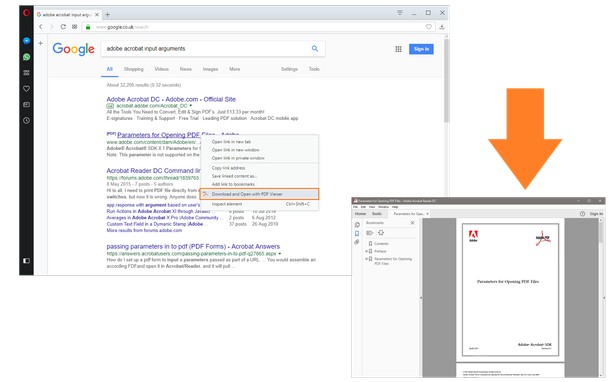
In order to operate with this addon, please right-click on any link (a link to a PDF document) and then click on - Open and Download with PDF Viewer - item from the context-menu. The PDF file will first be "downloaded" and then "opened" in a default PDF viewer (the one which is set in the options page). Please note that, the PDF file will be downloaded in the "default" download folder in your machine.
Note 2: before using the addon, please open the option's page and make sure the path to the PDF viewer is correct based on your Operating System.
In order to report any bug, please fill the bug report form in the addon's homepage (http://mybrowseraddon.com/open-in-pdf.html).
- This extension can exchange messages with programs other than Opera.
- This extension can create rich notifications and display them to you in the system tray.
Captura de pantalla
Acerca de la extensión
- Descargas
- 105 762
- Categoría
- Productividad
- Versión
- 0.1.6
- Tamaño
- 16,7 KB
- Última actualización
- 16 de febrero de 2026
- Licencia
- Copyright 2026 alexmarcoo
- Página de asistencia
- https://mybrowseraddon.com/open-in-pdf.html
Relacionados
-
Evernote Web Clipper
Utilice la extensión de Evernote para almacenar contenido de la Web en su cuenta.
Valoración: Número total de valoraciones: 549
-
Boomerang for Gmail™
Allows you to schedule messages to be sent or returned at a later date.
Valoración: Número total de valoraciones: 46
-
Set password for your browser ( Opera lock )
This extension will allow users to set password for the browser to avoid unauthorized access. Prompts for password on opera startup
Valoración: Número total de valoraciones: 123
-
Reopen in Private
Abra de nuevo la pestaña en una ventana de incógnito
Valoración: Número total de valoraciones: 0
-
GCTableSorter
Makes list and tables sortable (on geocaching.com)
Valoración: Número total de valoraciones: 3