Se necesita el navegador Opera.
A tool for boosting or reducing (attenuating) the levels of different frequencies of media elements in web pages.
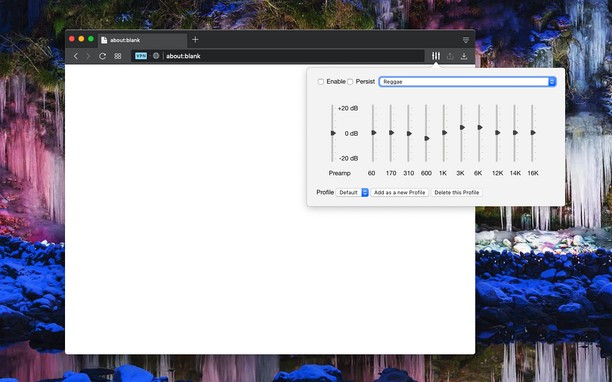
The most basic type of equalization is the bass control on the old home audio equipment to control low frequencies and the treble control to adjust high frequencies. Since there are only two controls, the adjustment is for a fairly wide range of frequencies. In this extension, however, you can adjust a wide set of frequency ranges (60, 170, 310, 600, 1K, 3K, 6K, 12K, 14K, 16K) similar to the well-known VLC player.
The extension adds a toolbar button to your browser to control audio equalization simply from its popup window. There are about 12 presets to select from or you can adjust your own levels. The extension offers profiling to keep user selections in different profiles.
This extension supports pre-amplification for each profile as well. Basically, you have a global volume control to adjust the level of each profile too.
For more info please read the FAQs page. You can submit bug reports in the GitHub page.
- Esta extensión puede acceder a tus datos en todos los sitios web.
Capturas de pantalla
Acerca de la extensión
- Descargas
- 517 764
- Categoría
- Música
- Versión
- 0.2.2
- Tamaño
- 72,4 KB
- Última actualización
- 28 de noviembre de 2022
- Licencia
- Copyright 2022 lunu-bounir
- Sitio de asistencia
- https://add0n.com/audio-equalizer.html
- Página de asistencia
- https://add0n.com/audio-equalizer.html
- Página del código fuente
- https://add0n.com/audio-equalizer.html
Relacionados
-
Advanced Audio Equalizer
Mejora tu experiencia de audio en línea con el Ecualizador de Audio Avanzado. Ajusta tu audio de pestaña en tiempo real
Valoración: Número total de valoraciones: 49
-
Last.fm Scrobbler for YouTube
Scrobbling YouTube music videos to Last.fm
Valoración: Número total de valoraciones: 16
-
Радио
Valoración: Número total de valoraciones: 116
-
Smooth Jazz South Florida
Listen Smooth Jazz South Florida Radio with Opera Browser.
Valoración: Número total de valoraciones: 1
-
Theater Mode for YouTube™
Forces YouTube to open the player in the theater mode (full-width mode) even if you are logged out
Valoración: Número total de valoraciones: 6