


 Opera browser required.
- This extension can access your tabs and browsing activity.
Screenshots

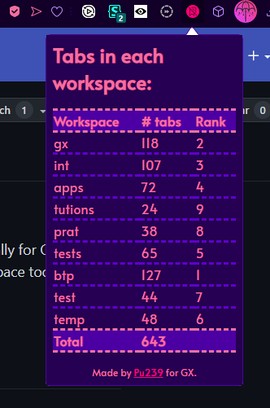
About the extension
- Downloads
- 1,779
- Category
- Productivity
- Version
- 1.0
- Size
- 67.8 KB
- Last update
- 30 May 2023
- Licence
- Privacy policy
- Support page
- https://github.com/plutonium-239/workspaces-tab-counter/issues
- Source code page
- https://github.com/plutonium-239/workspaces-tab-counter
Related
-

Site-specific Preferences
Edit preferences on a per-site basis
-

Boomerang for Gmail™
Allows you to schedule messages to be sent or returned at a later date.
-

SourceTraq: Git Repo Review Metrics
SourceTraq is your go-to tool for analyzing pull request trends, activities, and commit histories across multiple code repositories.
-

Motivate Clock Extension
Time tracking extension, which allows to sync statistic of websites between browser and Motivate Clock desktop app for Windows.
-

Evernote Web Clipper
Use the Evernote extension to save things you see on the web into your Evernote account.