Opera browser required.
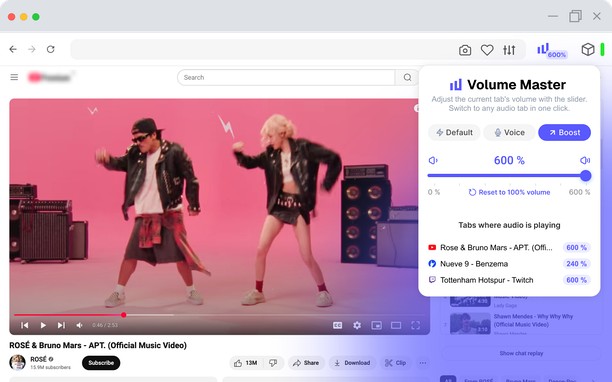
The extension boosts browser audio up to 600%.
Your ultimate tool for boosting volume in your browser!
Volume Master is a simple but powerful extension that allows you to boost the sound volume up to 600% on any tab. Watch videos, listen to music, and enjoy content on YT and other platforms with maximum comfort.
KEY FEATURES:
Volume boost up to 600% – customize the sound according to your preferences
Tab-specific volume control – adjust the sound separately for each tab
Fine tuning – volume range from 0% to 600%
Bass Booster – rich low frequencies for deep sound
Quick access – switch to any tab playing audio with a single click
Simple and convenient – minimalist design and intuitive interface
HOW IT WORKS:
— In full screen mode, browsers may limit the functionality of sound-enhancing extensions. For your convenience, a blue indicator will appear on the tab bar, signaling active sound amplification.
— Tip: To activate full screen mode, press F11 (Windows) or Ctrl + Cmd + F (Mac).
KEYBOARD SHORTCUTS:
When the pop-up is open and active, you can control the volume using these hotkeys:
• Left Arrow / Down Arrow – reduce volume by 10%
• Right Arrow / Up Arrow – increase volume by 10%
• Space – instantly boost volume to 100%
• M – mute/unmute
These shortcuts make volume adjustments quick and effortless, allowing you to fine-tune the audio directly from the pop-up with a single keystroke.
WHY ARE PERMISSIONS REQUIRED?
The extension requests access to website data to work with audio streams via AudioContext and to display active tabs with sound. This is necessary for sound amplification features to work correctly.
Install Volume Master and enjoy sound like never before!
YOUR PRIVACY IS OUR PRIORITY:
We do not collect, store, or share your personal data. Volume Master works locally on your device, ensuring complete security and confidentiality. The extension fully complies with the privacy policies of the extension stores.
Try Volume Master today and discover a new level of audio in your browser!
If you do not agree with the privacy policy, delete the extension and do not use it.
- This extension can access your data on all websites.
- This extension can access your data on some websites.
- This extension can access your tabs and browsing activity.
- This extension can store an unlimited amount of client-side data.
Screenshots

About the extension
- Downloads
- 7,168
- Category
- Accessibility
- Version
- 2.0.0
- Size
- 281.2 KB
- Last update
- 25 Nov 2025
- Licence
- Copyright 2025 ab41414d-16fa-4185-8188-aaddaa6346a3
- Privacy policy
Related
-
Pakistan Bills Guide
This blog has been written for people who are looking to learn the method of electricity bill check.
Rating: Total number of ratings: 1
-
Open in MS Edge™ Browser
Send current page's link or all tabs to Microsoft Edge browser or define optional left-click opening rules.
Rating: Total number of ratings: 13
-
Electric Smokers
You will love the peaceful cooking adventure in which you will set your best electric smoker and forget it until it cooks the delicious food!
Rating: Total number of ratings: 0
-
Segway Ninebot S Max vs S Plus
Are you looking for the best self balancing scooter to buy for your daily commute? Then the Segway Ninebot S Max vs S Plus comparison is perfect for you.
Rating: Total number of ratings: 2
-
Zoom
Zoom in or out on web content using the zoom button and mouse scroll wheel for more comfortable reading. That to each percent value.
Rating: Total number of ratings: 204